Release date: January 22, 2015
Vulnerability identifier: APSB15-02
CVE number: CVE-2015-0310
Platform: All Platforms
Showing posts with label update. Show all posts
Showing posts with label update. Show all posts
Wednesday, May 10, 2017
Oracle Java Quarterly Critical Security Update January 2016
Oracle Java Quarterly Critical Security Update January 2016

Oracle released the scheduled critical security updates for its Java SE Runtime Environment software and, once again, released a subsequent update that includes "bug fixes".
Unwanted "Extras"
Although most people do not need Java on their computer, there are some programs and games that require Java. In the event you need to continue using Java, How-to Geek discovered a little-known and unpublicized option in the Java Control Panel to suppress the offers for the pre-checked unwanted extras that Oracle has long included with the updates. Although the Ask Toolbar has been removed, tha does not preclude the pre-checked option for some other unnecessary add-on.Do the following to suppress the sponsor offers:
- Launch the Windows Start menu
- Click on Programs
- Find the Java program listing
- Click Configure Java to launch the Java Control Panel
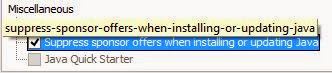
- Click the Advanced tab and go to the "Miscellaneous" section at the bottom.
- Check the box by the “Suppress sponsor offers when installing or updating Java” option and click OK.
Windows XP
For information on Java support for Windows XP, organizations and individuals who must continue using Windows XP and have Java installed are referred to the Oracle blog post, The future of Java on Windows XP (Henrik on Java).Update
If Java is still installed on your computer, it is recommended that this update be applied as soon as possible due to the threat posed by a successful attack.Download Information
Download link: Java SE 8u71Java SE 8u72 can be found here. Select the appropriate version for your operating system.
Verify your version: http://www.java.com/en/download/testjava.jsp
Notes:
- UNcheck any pre-checked toolbar and/or software options presented with the update. They are not part of the software update and are completely optional.
- Starting with Java SE 7 Update 21 in April 2013, all Java Applets and Web Start Applications should be signed with a trusted certificate. It is not recommended to run untrusted/unsigned Certificates. See How to protect your computer against dangerous Java Applets
Critical Patch Updates
For Oracle Java SE Critical Patch Updates, the next scheduled dates are as follows:- 19 April 2016
- 19 July 2016
- 18 October 2016
- 17 January 2017
Java Security Recommendations
For those people who have desktop applications that require Java and cannot uninstall it, Java can now be disabled in Internet Explorer. See Microsoft Fix it to Disable Java in Internet Explorer.1) In the Java Control Panel, at minimum, set the security to high.
2) Keep Java disabled until needed. Uncheck the box "Enable Java content in the browser" in the Java Control Panel.

3) If you use Firefox or Pale Moon, install NoScript and only allow Java on those sites where it is required.
Instructions on removing older (and less secure) versions of Java can be found at http://java.com/en/download/faq/remove_olderversions.xml
References
- Java SE 8u71 Update Release Notes
- Java SE 8u72 Update Release Notes
- Java, The Never-Ending Saga
- Oracle Critical Patch Update Advisory
- Oracle Quality Assurance Blog
- Critical Patch Updates and Security Alerts

Remember - "A day without laughter is a day wasted."
May the wind sing to you and the sun rise in your heart...
Go to link Download

Friday, April 28, 2017
Oracle Java Quarterly Security Update October 2015
Oracle Java Quarterly Security Update October 2015
Oracle released the scheduled critical security updates for its Java SE Runtime Environment software along with a subsequent update that includes "bug fixes".
Unwanted "Extras"
Although most people do not need Java on their computer, there are some programs and games that require Java. In the event you need to continue using Java, How-to Geek discovered a little-known and unpublicized option in the Java Control Panel to suppress the offers for the pre-checked unwanted extras that Oracle has long included with the updates. Although the Ask Toolbar has been removed, tha does not preclude the pre-checked option for some other unnecessary add-on.Do the following to suppress the sponsor offers:
- Launch the Windows Start menu
- Click on Programs
- Find the Java program listing
- Click Configure Java to launch the Java Control Panel
- Click the Advanced tab and go to the "Miscellaneous" section at the bottom.
- Check the box by the “Suppress sponsor offers when installing or updating Java” option and click OK.
Windows XP
For information on Java support for Windows XP, organizations and individuals who must continue using Windows XP and have Java installed are referred to the Oracle blog post, The future of Java on Windows XP (Henrik on Java).Update
If Java is still installed on your computer, it is recommended that this update be applied as soon as possible due to the threat posed by a successful attack.Download Information
Download link: Java SE 8u65Java SE 8u66 can be found here. Select the appropriate version for your operating system.
Verify your version: http://www.java.com/en/download/testjava.jsp
Notes:
- UNcheck any pre-checked toolbar and/or software options presented with the update. They are not part of the software update and are completely optional.
- Starting with Java SE 7 Update 21 in April 2013, all Java Applets and Web Start Applications should be signed with a trusted certificate. It is not recommended to run untrusted/unsigned Certificates. See How to protect your computer against dangerous Java Applets
Critical Patch Updates
For Oracle Java SE Critical Patch Updates, the next scheduled dates are as follows:- 19 January 2016
- 19 April 2016
- 19 July 2016
- 18 October 2016
Java Security Recommendations
For those people who have desktop applications that require Java and cannot uninstall it, Java can now be disabled in Internet Explorer. See Microsoft Fix it to Disable Java in Internet Explorer.1) In the Java Control Panel, at minimum, set the security to high.
2) Keep Java disabled until needed. Uncheck the box "Enable Java content in the browser" in the Java Control Panel.
3) If you use Firefox or Pale Moon, install NoScript and only allow Java on those sites where it is required.
Instructions on removing older (and less secure) versions of Java can be found at http://java.com/en/download/faq/remove_olderversions.xml
References
- Java SE 8 Update Release Notes
- Java, The Never-Ending Saga
- Oracle Critical Patch Update Advisory
- Oracle Quality Assurance Blog
- Critical Patch Updates and Security Alerts
Remember - "A day without laughter is a day wasted."
May the wind sing to you and the sun rise in your heart...
Go to link Download
Tuesday, April 25, 2017
MP3 Free Downloader Software Latest Update
MP3 Free Downloader Software Latest Update
MP3 Free Downloader Software Latest Update
MP3 Free Downloader Software Latest Update - Free MP3 Downloader is a program to find safe songs online and download free them so that you can enjoy anytime offline.The general layout and design of the program is smooth and easy to navigate. However, we had a big problem with the performance of the program. Although he easily found the results of the song in seconds, trying to hear a song or download, it just does not. This may have been because we tried the free version; allegedly paid version of the program is faster. This would have meant that any kind of download progress with the free version could be made, but we saw none of the wait after 20 minutes. If this works for you, you will probably like the fact that it is much safer for the computer to surf the Internet for songs on questionable sites. But because it is simply not not work for us, we can not say anything about the speed or quality of downloaded music. We went to support to see if information about the problem that we had, but it was not helpful.
 |
| MP3 Free Downloader |
Free MP3 Downloader is an incredibly useful program that users from browsing and download MP3 allows for free. It has over 100 million mp3 sources across all genres for your choice, by an amazingly user friendly interface satisfied, save online files quickly and conveniently. With MP3 Free Downloader, you can also listen to music without your songs to download that first. Listen and download, if you really love. It will save your time and effort in unintended songs. No idea of ??the name of the song? Simply enter keywords, you have our full support research in Google.
Download Here
MP3 Free Downloader Software Latest Update
Go to link Download
Sunday, April 16, 2017
Paint Tool SAI 1 2 2 Full Link Update
Paint Tool SAI 1 2 2 Full Link Update
Create a buddy who has the soul of artistic drawing on a blank paper, may be seen just a black and white color. then what if my friend did Scanning is then deliver color images of each side of the corner and make it look more vibrant parts using computer software, one of which is a popular use Paint Tool SAI.
Yups, the core of the software is merupkaan Paint Tool SAI graphic design software oriented toward the paint brush to give color from the image manually buddy to make it look more alive.
a lot of manga manga the coloring process in though using software Paint Tool SAI, because the light in its use and not complicated.

Size: 3mb
================================================
Download File
Paint Tool SAI 1.2.2 Full (Direct Link)
Paint Tool SAI 1.2.2 Full (Direct Link)
Go to link Download
Saturday, April 1, 2017
Oracle Java Critical Security Update
Oracle Java Critical Security Update
Oracle released the scheduled critical security updates for its Java SE Runtime Environment software.
This is a Critical Patch Update that affects Oracle Java SE, versions 5.0u71, 6u81, 7u67, 8u20. From The Assurance Blog:
"Out of the 154 vulnerabilities fixed with today’s Critical Patch Update release, 31 are for the Oracle Database. All but 3 of these database vulnerabilities are related to features implemented using Java in the Database, and a number of these vulnerabilities have received a CVSS Base Score of 9.0."
Unwanted "Extras"
Oracle has long included pre-checked options with the updates. Although most people do not need Java on their computer, there are some programs and games that require Java. In the event you need to continue using Java, How-to Geek discovered a little-known and unpublicized option in the Java Control Panel to suppress the offers for the pre-checked unwanted extras.- Launch the Windows Start menu
- Click on Programs
- Find the Java program listing
- Click Configure Java to launch the Java Control Panel
- Click the Advanced tab and go to the "Miscellaneous" section at the bottom.
- Check the box by the “Suppress sponsor offers when installing or updating Java” option and click OK.
Windows XP
There has been a lot of recent controversy regarding Java updates for Windows XP. While Windows XP has reached end of life, Java 7 will continue to be updated until April, 2015.Thus, organizations and individuals who must continue using Windows XP and have Java installed can also continue getting updates for Java 7. It is noted, however, that if an issue arises that is specific to Windows XP, Oracle is not required to and also may not be able to create a patch. For additional information, refer to the Oracle blog post, The future of Java on Windows XP (Henrik on Java).
Update
If Java is still installed on your computer, it is recommended that this update be applied as soon as possible due to the threat posed by a successful attack.Download Information
Download link: Java SE 8u25Verify your version: http://www.java.com/en/download/testjava.jsp
Notes:
- UNcheck any pre-checked toolbar and/or software options presented with the update. They are not part of the software update and are completely optional.
- Starting with Java SE 7 Update 21 in April 2013, all Java Applets and Web Start Applications should be signed with a trusted certificate. It is not recommended to run untrusted/unsigned Certificates. See How to protect your computer against dangerous Java Applets
Critical Patch Updates
For Oracle Java SE Critical Patch Updates, the next scheduled dates are as follows:- 20 January 2015
- 14 April 2015
- 14 July 2015
- 20 October 2015
Java Security Recommendations
For those people who have desktop applications that require Java and cannot uninstall it, Java can now be disabled in Internet Explorer. See Microsoft Fix it to Disable Java in Internet Explorer.1) In the Java Control Panel, at minimum, set the security to high.
2) Keep Java disabled until needed. Uncheck the box "Enable Java content in the browser" in the Java Control Panel.
 |
| (Image via Sophos Naked Security Blog) |
3) If you use Firefox, install NoScript and only allow Java on those sites where it is required.
Instructions on removing older (and less secure) versions of Java can be found at http://java.com/en/download/faq/remove_olderversions.xml
References
- Java SE 8 Update Release Notes
- Java, The Never-Ending Saga
- Oracle Quality Assurance Blog
- Oracle Critical Patch Update Advisory October 2014
- Oracle Critical Patch Advisory
Remember - "A day without laughter is a day wasted."
May the wind sing to you and the sun rise in your heart...
Go to link Download
Thursday, March 16, 2017
Nokia PC Suite the latest update 2012
Nokia PC Suite the latest update 2012
an application designed to enable Nokia phone owners to transfer important files from the phone to computer and vice versa, but also to control some of the features of the mobile phone directly from your computer or laptop. This feature is similar to the Sony Ericsson PC Suite which Ive shared before.
This software provides several new functions to their Nokia mobile phone users, including editing, backing up and syncing files. Nokia PC Suite for 2012 is quite good at doing it, other than that the latest Nokia PC suite 2012 is also very easy to
operation with a very nice interface and intuitive Hannya youll get used to using it in a matter of minutes.
With Nokia PC Suite for 2012 All functions are accessible from the main interface, as soon as the phone is successfully connected to a computer. There are four connectivity options: Bluetooth, infrared, serial cable (CA-42) and a USB cable.

Sometimes, some connection problems can occur when trying to pair your phone and computer. Also transfer files or other functions of the application may be not available. If this happens, you must remove the device and try to make new connections.Messaging functions Nokia PC Suite for 2012 is very useful because it allows you to write SMS messages on your computer and send it to someone in your address book. Note, however, that the message is not automatically transferred to the phone menu "Sent".Synchronisation and backup feature allows you to save content that is stored on your Nokia phone safe and ready to recover quickly. You can synchronize your notes, calendar and contacts and thus keep them up to date on both computers and mobile devices.Here are some key features of "Nokia PC Suite for 2012":· Back up and restore phone files· Transfer information, pictures, and music from phone to phone or phone to PC· Synchronize your phone and PC calendars· Edit contacts, pictures, and phone file names· Install Java-based applications in your phone· Convert ringing tone formats· Play multimedia messages and videos· Send text messages from the PC· Connect by using your phone as a modem
Download Location : Nokia PC Suite - the latest update 2012
| .. |
|---|
Go to link Download
Saturday, March 4, 2017
Nokia BB5 Contact service solution update
Nokia BB5 Contact service solution update
Nokia BB5 Contact service solution update
Nokia Bb5 Contact service solution
SX4: SX4 Smart Card, is a tool or method which is developed by Nokia to
write some data protection for a specific area in EEPROM is useful for
preventing modification of the data.
write some data protection for a specific area in EEPROM is useful for
preventing modification of the data.
When SX4 PROCESS is Required ?
In the case of a loss (data corrupt) data charging (not charging), data
network (no network). Dll.RF calibration calibration-charging.
So, all these problems caused by mistakes in the process of flashing or after
write RPL or erase process is done in a certain area
network (no network). Dll.RF calibration calibration-charging.
So, all these problems caused by mistakes in the process of flashing or after
write RPL or erase process is done in a certain area
HOW DO I KNOW THAT MY PHONE PROCESS SX4 needs to be done?
When the phone appears CONTACT SERVICE, CONTACT retailers, NOT
charging after flashing, no network, etc. When the SELF TEST is done by
using the box like JAF repair, etc. will be obtained is the result of failed "ST_SECURITY_TEST Failed"
charging after flashing, no network, etc. When the SELF TEST is done by
using the box like JAF repair, etc. will be obtained is the result of failed "ST_SECURITY_TEST Failed"
How do I make a SX4?
Plug the phone in the repair box (JAF, MTBOX, MXKEY, etc.)
Write pm area with 309 results read from the normal mobile phone or can
also write FULL PM area without 308 (SIMLOCK area).
Write pm area with 309 results read from the normal mobile phone or can
also write FULL PM area without 308 (SIMLOCK area).
What to do sx4 without internet connection?
sure Certificate damaged area musti made first with the FLASH erase, or
write RPL blank
Reset NPC (when using mxkey)
What is a Certificate Area?
Press info on the box like JAF flasher, etc. and see the results LOG ...
This is an example of the correct Certificate
Default SN type:
write RPL blank
Reset NPC (when using mxkey)
What is a Certificate Area?
Press info on the box like JAF flasher, etc. and see the results LOG ...
This is an example of the correct Certificate
Default SN type:
Code:
IMEI plain: 351862xxxxxxxxxx
IMEI spare to net: 3A 15 68 02 01 23 60 03
IMEI SV to net: 33 15 68 02 01 23 60 03 F6
LOCK STATUS:
Config KEY: 0000000000000000
Provider KEY: 2440700000000000
Provider: AT &T; U.S.A. (3650)
Key Code count: 0, FBUS Code count: 0
Block 1:Lock 1: OPEN Lock 2: OPEN Lock 3: OPEN Lock 4: OPEN Lock 5: OPEN
IMEI spare to net: 3A 15 68 02 01 23 60 03
IMEI SV to net: 33 15 68 02 01 23 60 03 F6
LOCK STATUS:
Config KEY: 0000000000000000
Provider KEY: 2440700000000000
Provider: AT &T; U.S.A. (3650)
Key Code count: 0, FBUS Code count: 0
Block 1:Lock 1: OPEN Lock 2: OPEN Lock 3: OPEN Lock 4: OPEN Lock 5: OPEN
Block 2: Lock 1: OPEN Lock 2: OPEN Lock 3: OPEN Lock 4: OPEN Lock 5: OPEN
Block 3: Lock 1: OPEN Lock 2: OPEN Lock 3: OPEN Lock 4: OPEN Lock 5: OPEN
Block 4: Lock 1: OPEN Lock 2: OPEN Lock 3: OPEN Lock 4: OPEN Lock 5: OPEN
Block 5: Lock 1: OPEN Lock 2: OPEN Lock 3: OPEN Lock 4: OPEN Lock 5: OPEN
Block 6: Lock 1: OPEN Lock 2: OPEN Lock 3: OPEN Lock 4: OPEN Lock 5: OPEN
Block 7: Lock 1: OPEN Lock 2: OPEN Lock 3: OPEN Lock 4: OPEN Lock 5: OPEN
This is an example Certificate of damaged
Default SN type:
Default SN type:
Code:
IMEI plain: 123456765321?
LOCK STATUS:
Config KEY: fffffffffffffffffffffff
Provider KEY: fffffffffffffffffffff
Provider: Unknown
Key Code count: 0, FBUS Code count: 0
IMEI plain: 123456765321?
LOCK STATUS:
Config KEY: fffffffffffffffffffffff
Provider KEY: fffffffffffffffffffff
Provider: Unknown
Key Code count: 0, FBUS Code count: 0
Block 1: Lock 1: CLOSED
BB5 Contact Service, Restart Problem,How To Erase BB5, Restore PM and RPL Backup!!!
I saw here many times peoples are having with this "Contact Service or Provider" problem
and also unable to Write or Restore the Orignal backup to the Phone. just follow and learned how to repair BB5 Contact Service/Retailer, how to erase BB5 and Restore PM and RPL Backup!!! Now we shall more reflect upon this matter;- How To Remove Contact Service or Provider ?
Firstly we should get Phone Info and see Imei and SL (Sim Lock) Zone are damaged or Not.Get Phone Info:
In Case when you got Damaged Imei: 123456789012345 and you dont have Orignal RPL Backup
then free way is try to solve this problem by downgrading if Imei and SP Data is still damage,
then Upgrade it back and you must need to buy an new RPL to fix this problem. Use ASK to RPL Service.
In Case when Phone Imei is oK but Only SL Zone is damaged and you dont have Orignal PM 308 backup then wat to do.If Courpted SP Data looks like this below:
and also unable to Write or Restore the Orignal backup to the Phone. just follow and learned how to repair BB5 Contact Service/Retailer, how to erase BB5 and Restore PM and RPL Backup!!! Now we shall more reflect upon this matter;- How To Remove Contact Service or Provider ?
Firstly we should get Phone Info and see Imei and SL (Sim Lock) Zone are damaged or Not.Get Phone Info:
In Case when you got Damaged Imei: 123456789012345 and you dont have Orignal RPL Backup
then free way is try to solve this problem by downgrading if Imei and SP Data is still damage,
then Upgrade it back and you must need to buy an new RPL to fix this problem. Use ASK to RPL Service.
In Case when Phone Imei is oK but Only SL Zone is damaged and you dont have Orignal PM 308 backup then wat to do.If Courpted SP Data looks like this below:
CONFIG KEY: FFFFFFFFFFFFFFFF
PROVIDER KEY: FFFFFFFFFFFFFFFF
Provider: Unknown provider
And phone is supported for Unlocking, then you can try to Repair it free with any BB5 Unlocker by Unlock Button or with Repair SP Data Option. (It should Repair) Otherewise you may need to New RPL.
PROVIDER KEY: FFFFFFFFFFFFFFFF
Provider: Unknown provider
And phone is supported for Unlocking, then you can try to Repair it free with any BB5 Unlocker by Unlock Button or with Repair SP Data Option. (It should Repair) Otherewise you may need to New RPL.
And If Courpted SP Data looks like this:
CONFIG KEY: 0000000000000000
PROVIDER KEY: 0000000000000000
Provider: Unknown provide
Then you must need to buy an New RPL whether Phone is supported with any BB5 Unlocker.
We can not Repair it free, Use Ask To Rpl Service.In Case when you have RPL Backup and have not PM 308, you can only Restore the Phone Imei but you can not Repair the Courpted SP Data like this: PROVIDER KEY: 0000000000000000,
Provider: Unknown provide In Case when you have PM 308 backup and have not RPL, you can Repair SP Data but you can not Repair Phone Imei by only PM 308 backup. Use ASK To RPL Service.
In Case when Phone Imei and SL Zone both are OK but phone is still on Contact
CONFIG KEY: 0000000000000000
PROVIDER KEY: 0000000000000000
Provider: Unknown provide
Then you must need to buy an New RPL whether Phone is supported with any BB5 Unlocker.
We can not Repair it free, Use Ask To Rpl Service.In Case when you have RPL Backup and have not PM 308, you can only Restore the Phone Imei but you can not Repair the Courpted SP Data like this: PROVIDER KEY: 0000000000000000,
Provider: Unknown provide In Case when you have PM 308 backup and have not RPL, you can Repair SP Data but you can not Repair Phone Imei by only PM 308 backup. Use ASK To RPL Service.
In Case when Phone Imei and SL Zone both are OK but phone is still on Contact
Service/Provider.
First take Self Test and check ST Security Test is Passed or Failed?
If Passed then do File System Formate and after that make Factory Setting and see problem is
solved or not, if still same then check phone hardware.
And if ST Security Test is Failed then Write PM Field [1] And [309] as stanner said,
(or full pm as you wish) by using SX4 Auth Service and after that make Factory Setting.
Oftenly Phone can Repair by Downgrading and Writing RPL.
Then Write PM With SX4 if same then Update back and See problem is Solved or not.
(It should work now!) otherwise try to repair it by erasing method.
First take Self Test and check ST Security Test is Passed or Failed?
If Passed then do File System Formate and after that make Factory Setting and see problem is
solved or not, if still same then check phone hardware.
And if ST Security Test is Failed then Write PM Field [1] And [309] as stanner said,
(or full pm as you wish) by using SX4 Auth Service and after that make Factory Setting.
Oftenly Phone can Repair by Downgrading and Writing RPL.
Then Write PM With SX4 if same then Update back and See problem is Solved or not.
(It should work now!) otherwise try to repair it by erasing method.
How To Remove Restart Problem when Phone Imei is oK but Phone goes to Restart or Shut Off after a while
In this case first try to solve this problem by only Write Full Modified (Without 308 Field) PM With
SX4 Auth.Use SX4 and when it done Successfully then immediately Write supported full modified PM to the phone and check phone without MMC, problem is fixed or not, if not then Full Flash and after that Write PM with SX4, or try to solve
by Downgrading.Oftenly Restart problem is removed by only do File System Format and Factory Default. (Check
phone without MMC) Otherwise there is only one way is left to Repair it with Software and that
is Erase Flash (Rap), to start the Erasing Procedure,
SX4 Auth.Use SX4 and when it done Successfully then immediately Write supported full modified PM to the phone and check phone without MMC, problem is fixed or not, if not then Full Flash and after that Write PM with SX4, or try to solve
by Downgrading.Oftenly Restart problem is removed by only do File System Format and Factory Default. (Check
phone without MMC) Otherwise there is only one way is left to Repair it with Software and that
is Erase Flash (Rap), to start the Erasing Procedure,
Follow this given below Method:
Before Start Erasing Flash, Save your both backup PM 308 and RPL backup (CRT 308 and CRT
BKP)If you are going to do erase newer BB5 + (Plus) Phone then you must Save also Full PM 0 to 400
Backup, coz you will need it for restore the orignal field 308, this is really fast easy and perfect
way to restore the PM 308 Field, otherwise you may need to buy an new RPL.So be careful. . .
Now we are ready to do erase.Select UNI_rapido.bin in Mcu Part and click to Flash
and for MT Select uni_rap.bin as MCU.
when phone will fully erased then Phone Imei will be: 12345610654321, SP Area will damaged
and CMT Flash Data will shown: FFFFFFFFFFFFFFFFFFFFFFFFFFFFFFFF
Now Full flash with any Firmware ver but selected firmware should be not too Old or too New,
coz we may need it in another case.After Flash when phone will turn On, you will get
damaged IMEI: 12345610654321 and Courpted SP Area:
PROVIDER KEY: 0000000000000000, Provider: Unknown provide
Now first of all you have to Restore the Orignal backup of PM 308, in case when you are unable
to restore the PM 308 backup then flash again with same FW when you were take backup.
When it flash successfully then plz stay a min and write it (PM 308) back to the phone, now
Disconnect phone, connect it again and see SL Zone is Repaired or Not.
(It should be repair now), if not then flash again with same FW and restore the PM 308 backup.
But if you have Full PM 0-400 backup then no need to Flash again, just Write it (Full PM 0-400
backup) back to the phone without SX4,when it done successfully then remove cable to the box,
replug cable and get info you will see SP Area is Repaired now, if not then it will be repair after
writing RPL backup.
After successfully restore the PM 308 backup phone will on Contact Service/Retailers or full
working phone with damaged Imei. In this condition when phone has damaged Imei:
12345610654321 you can write full modified PM
(without 308 field) without using SX4, coz phone has not certificate (IMEI), therefor no need to
use SX4.Now we have to Restore RPL backup. If you are using JAF then Click on CRT Tool, now you will
BKP)If you are going to do erase newer BB5 + (Plus) Phone then you must Save also Full PM 0 to 400
Backup, coz you will need it for restore the orignal field 308, this is really fast easy and perfect
way to restore the PM 308 Field, otherwise you may need to buy an new RPL.So be careful. . .
Now we are ready to do erase.Select UNI_rapido.bin in Mcu Part and click to Flash
and for MT Select uni_rap.bin as MCU.
when phone will fully erased then Phone Imei will be: 12345610654321, SP Area will damaged
and CMT Flash Data will shown: FFFFFFFFFFFFFFFFFFFFFFFFFFFFFFFF
Now Full flash with any Firmware ver but selected firmware should be not too Old or too New,
coz we may need it in another case.After Flash when phone will turn On, you will get
damaged IMEI: 12345610654321 and Courpted SP Area:
PROVIDER KEY: 0000000000000000, Provider: Unknown provide
Now first of all you have to Restore the Orignal backup of PM 308, in case when you are unable
to restore the PM 308 backup then flash again with same FW when you were take backup.
When it flash successfully then plz stay a min and write it (PM 308) back to the phone, now
Disconnect phone, connect it again and see SL Zone is Repaired or Not.
(It should be repair now), if not then flash again with same FW and restore the PM 308 backup.
But if you have Full PM 0-400 backup then no need to Flash again, just Write it (Full PM 0-400
backup) back to the phone without SX4,when it done successfully then remove cable to the box,
replug cable and get info you will see SP Area is Repaired now, if not then it will be repair after
writing RPL backup.
After successfully restore the PM 308 backup phone will on Contact Service/Retailers or full
working phone with damaged Imei. In this condition when phone has damaged Imei:
12345610654321 you can write full modified PM
(without 308 field) without using SX4, coz phone has not certificate (IMEI), therefor no need to
use SX4.Now we have to Restore RPL backup. If you are using JAF then Click on CRT Tool, now you will
see BB5 Certificate Tool Window
tick on Write RPL Option and also mark on Plain RPL box, now Select your RPL backup and
click on Write RPL button.Get info now and see Imei is restored succcessfully or not phone
should be on Contact Service/Retailer or fully working. . .
But if you are failed to restore the RPL backup, i mean phone Imei is still damage and phone
show only Nokia and then shut Off in case now you Write blank_rpl and Flash again with Latest Firm Ware.
When it (flash process) done successfully then write RPL backup, get Info and see Imei is back or
not, it (Imei) should back now, and your Phone will on Contact Service/Retailer, if Not and you
got dead phone Please follow again all above erasing method.
Finally use SX4 and Write PM Field [1] and [309] (or full pm as you wish), now we have done all
abt Software.I think Thats all. . . abt BB5 Repair with Erasing Method and we have confirmed
now, phone has Software Problem or not.
click on Write RPL button.Get info now and see Imei is restored succcessfully or not phone
should be on Contact Service/Retailer or fully working. . .
But if you are failed to restore the RPL backup, i mean phone Imei is still damage and phone
show only Nokia and then shut Off in case now you Write blank_rpl and Flash again with Latest Firm Ware.
When it (flash process) done successfully then write RPL backup, get Info and see Imei is back or
not, it (Imei) should back now, and your Phone will on Contact Service/Retailer, if Not and you
got dead phone Please follow again all above erasing method.
Finally use SX4 and Write PM Field [1] and [309] (or full pm as you wish), now we have done all
abt Software.I think Thats all. . . abt BB5 Repair with Erasing Method and we have confirmed
now, phone has Software Problem or not.
Go to link Download
Friday, March 3, 2017
Official Kies Update Android 2 3 3 Gingerbrd S5830XWKPF S5830XXKPE for Galaxy Ace relsed!
Official Kies Update Android 2 3 3 Gingerbrd S5830XWKPF S5830XXKPE for Galaxy Ace relsed!
As of today, officially relses the Android 2.3.3 Gingerbrd for Galaxy Ace S5830 users via KIES. The first official updates hits over Russia and Poland users, and will be coming soon next across other Regions.
To those who want to try it out and cant wait over KIES, you can manually flash it by using ODIN, you can grab a copy of OTA update stock.
KIES: Update your
Go to link Download
Thursday, February 9, 2017
NOD32 Offline Update 18 Okt 2012
NOD32 Offline Update 18 Okt 2012
Compatable with:
NOD32 Smart Security v3.0.xxx (all versions)
NOD32 Antivirus v3.0.xxx (all versions)
NOD32 Smart Security v4.0.xxx (all versions)
NOD32 Antivirus v4.0.xxx (all versions)
NOD32 Smart Security v4.2.xxx (all versions)
NOD32 Antivirus v4.2.xxx (all versions)
NOD32 Antivirus v5.0.xxx (all versions)
NOD32 Smart Security v5.0.xxx (all versions)
Credit : nod32offlineupdate.blogspot.com
Download
Go to link Download
Monday, February 6, 2017
Order of Battle Pacific Update v1 6 7 Game For Mac
Order of Battle Pacific Update v1 6 7 Game For Mac
Order of Battle Pacific Update v1.6.7 For Mac
![Order of Battle Pacific Update v1.6.7 [MULTI][RELOADED]](https://lh3.googleusercontent.com/blogger_img_proxy/AEn0k_sDb1fCRXt9CvlQ65L5Jx5lLTM90rhoUePqmTD6I2HWAgIiXaiYCk9bJqtw_VCU1jOkbhfnufk4h5Y6Ul1O3Ko-5owWNxcIspoZdEolMStk08ywfwZQky3nqGqkwef0cZzsAXPcXv8SYWZaVrqFF0MIJFgpKVj2uLizXulN45OGC2j-JYmQwnnmHA=s0-d)

Platform: PC
Language 


Gender:Estrategia,Simuladores
Quality: DVD
Format: ISO
Size: 121.01 MB
Fecha: 20-09-2015
Release: RELOADED


Go to link Download
Saturday, February 4, 2017
ODIN Guide How to Update Upgrade Galaxy Ace S5830 to Android 2 3 3 Gingerbrd XXKPT Firmware
ODIN Guide How to Update Upgrade Galaxy Ace S5830 to Android 2 3 3 Gingerbrd XXKPT Firmware
Heres the step by step procedure on how to manually install the firmware build S5830XWKPT to Galaxy Ace S5830, which will update the phone to android 2.3.3 Gingerbrd version. The S5830XWKPT build firmware has a CSC file of XEOKP2 a Polski default language which is for Poland but you can manually change it according to your desire language or in your region.
Firmware details:
PDA:
Go to link Download
Thursday, February 2, 2017
Oracle Java Quarterly Security Update Released
Oracle Java Quarterly Security Update Released
Oracle released the scheduled critical security updates for its Java SE Runtime Environment software.
It is important to also note that this release will be the last Oracle JDK 7 publicly available update. For more information, and details on how to receive longer term support for Oracle JDK 7, please see the Oracle Java SE Support Roadmap.
Unwanted "Extras"
Oracle has long included pre-checked options with the updates. Although most people do not need Java on their computer, there are some programs and games that require Java. In the event you need to continue using Java, How-to Geek discovered a little-known and unpublicized option in the Java Control Panel to suppress the offers for the pre-checked unwanted extras.- Launch the Windows Start menu
- Click on Programs
- Find the Java program listing
- Click Configure Java to launch the Java Control Panel
- Click the Advanced tab and go to the "Miscellaneous" section at the bottom.
- Check the box by the “Suppress sponsor offers when installing or updating Java” option and click OK.
Windows XP
For information on Java support for Windows XP, organizations and individuals who must continue using Windows XP and have Java installed are referred to the Oracle blog post, The future of Java on Windows XP (Henrik on Java).Update
If Java is still installed on your computer, it is recommended that this update be applied as soon as possible due to the threat posed by a successful attack.Download Information
Download link: Java SE 8u45Verify your version: http://www.java.com/en/download/testjava.jsp
Notes:
- UNcheck any pre-checked toolbar and/or software options presented with the update. They are not part of the software update and are completely optional.
- Starting with Java SE 7 Update 21 in April 2013, all Java Applets and Web Start Applications should be signed with a trusted certificate. It is not recommended to run untrusted/unsigned Certificates. See How to protect your computer against dangerous Java Applets
Critical Patch Updates
For Oracle Java SE Critical Patch Updates, the next scheduled dates are as follows:- 14 April 2015
- 14 July 2015
- 20 October 2015
- 19 January 2016
Java Security Recommendations
For those people who have desktop applications that require Java and cannot uninstall it, Java can now be disabled in Internet Explorer. See Microsoft Fix it to Disable Java in Internet Explorer.1) In the Java Control Panel, at minimum, set the security to high.
2) Keep Java disabled until needed. Uncheck the box "Enable Java content in the browser" in the Java Control Panel.
|
| (Image via Sophos Naked Security Blog) |
3) If you use Firefox or Pale Moon, install NoScript and only allow Java on those sites where it is required.
Instructions on removing older (and less secure) versions of Java can be found at http://java.com/en/download/faq/remove_olderversions.xml
References
- Java SE 8 Update Release Notes
- Oracle Critical Patch Update - January 2015
- Java, The Never-Ending Saga
- Oracle Quality Assurance Blog
- Critical Patch Updates and Security Alerts
Remember - "A day without laughter is a day wasted."
May the wind sing to you and the sun rise in your heart...
Go to link Download
Saturday, December 31, 2016
Navigon MN6 Westeurope Q2 2010 Map Update
Navigon MN6 Westeurope Q2 2010 Map Update

Navigon MN6 Westeurope Q2 2010 Map Update
| 1.74 GB
Jun.03.2010: Latest Maps of Westeurope for Navigon MobileNavigator 6/6.5 Q2_2010 incl. RealityViewPro.
Contains:
Andorra, Belgium, Denmark, Germany, Finland, France, Gibraltar, Great Britain, The Isle of Man, Ireland, Italy, Liechtenstein, Luxembourg, Monte Carlo, Netherlands, Norway, Austria, Portugal, San Marino, Sweden, Switzerland, Spain, Vatican.
Have fun driving!.
Download from Hotfile
http://hotfile.com/list/561519/ecf4559
Download from Uploading
http://uploading.com/files/5d195627/NMN6WESTQ22010.part01.rar/
http://uploading.com/files/f39fae5m/NMN6WESTQ22010.part02.rar/
http://uploading.com/files/ea2b7d3d/NMN6WESTQ22010.part03.rar/
http://uploading.com/files/292fae1a/NMN6WESTQ22010.part04.rar/
http://uploading.com/files/95edac82/NMN6WESTQ22010.part05.rar/
http://uploading.com/files/48dm9e8a/NMN6WESTQ22010.part06.rar/
http://uploading.com/files/71d166d2/NMN6WESTQ22010.part07.rar/
http://uploading.com/files/ecb76d98/NMN6WESTQ22010.part08.rar/
http://uploading.com/files/2bd27m2b/NMN6WESTQ22010.part09.rar/
http://uploading.com/files/f39fae5m/NMN6WESTQ22010.part02.rar/
http://uploading.com/files/ea2b7d3d/NMN6WESTQ22010.part03.rar/
http://uploading.com/files/292fae1a/NMN6WESTQ22010.part04.rar/
http://uploading.com/files/95edac82/NMN6WESTQ22010.part05.rar/
http://uploading.com/files/48dm9e8a/NMN6WESTQ22010.part06.rar/
http://uploading.com/files/71d166d2/NMN6WESTQ22010.part07.rar/
http://uploading.com/files/ecb76d98/NMN6WESTQ22010.part08.rar/
http://uploading.com/files/2bd27m2b/NMN6WESTQ22010.part09.rar/
Download from Fileserve
Full Software | click Here
Go to link Download
Sunday, December 18, 2016
Out of Band Adobe Flash Player Critical Security Update
Out of Band Adobe Flash Player Critical Security Update

Adobe has released security updates for Adobe Flash Player 16.0.0.257 and earlier versions for Windows and Macintosh and Adobe Flash Player 11.2.202.425 and earlier versions for Linux.
Correction: From Threatpost, Adobe Patches One Zero Day in Flash, Still Investigating Separate Vulnerability:
"The vulnerability that Adobe patched Thursday is under active attack, but Adobe officials said that this flaw is not the one that security researcher Kafeine said Wednesday was being used in the Angler attacks."The Threatpost article further indicated that there is no indication from Adobe officials that an update is in the works for the Angler zero-day vulnerability.
Adobe officials did not say whether there is an update in the works for the zero-day vulnerability. - See more at: http://threatpost.com/adobe-patches-one-zero-day-in-flash-still-investigating-separate-vulnerability#sthash.l1CqIaAn.dpuf
Adobe officials did not say whether there is an update in the works for the zero-day vulnerability. - See more at: http://threatpost.com/adobe-patches-one-zero-day-in-flash-still-investigating-separate-vulnerability#sthash.l1CqIaAn.dpuf
Adobe officials did not say whether there is an update in the works for the zero-day vulnerability. - See more at: http://threatpost.com/adobe-patches-one-zero-day-in-flash-still-investigating-separate-vulnerability#sthash.l1CqIaAn.dpuf
The update below has been released by Adobe to address the vulnerability. It is strongly advised that the update be applied as soon as possible.
Update Information:
- Users of the Adobe Flash Player desktop runtime for Windows and Macintosh should update to Adobe Flash Player 16.0.0.287.
- Users of the Adobe Flash Player Extended Support Release should update to Adobe Flash Player 13.0.0.262.
- Users of Adobe Flash Player for Linux should update to Adobe Flash Player 11.2.202.438.
- Adobe Flash Player installed with Google Chrome, as well as Internet Explorer on Windows 8.x, will automatically update to the current version.
Flash Player Update Instructions
Warning: Although Adobe suggests downloading the update from the Adobe Flash Player Download Center, that link includes a pre-checked option to install unnecessary extras, such as McAfee Scan Plus or Google Drive. If you use the download center, uncheck any unnecessary extras.It is recommended that you either use the auto-update mechanism within the product when prompted, or my preference, the direct download links.
- Non-IE Plugin (Opera, Firefox, Etc.): http://download.macromedia.com/get/flashplayer/current/licensing/win/install_flash_player_16_plugin.exe
- Flash Player For Internet Explorer, Windows 7 and earlier: http://download.macromedia.com/get/flashplayer/current/licensing/win/install_flash_player_16_active_x.exe
Internet Explorer, Windows 8 and above: Microsoft updated Security Advisory 2755801. If you do not have Automatic Updates enabled, the Flash Player update can be downloaded from Microsoft Security Advisory: Update for Vulnerabilities in Adobe Flash Player in Internet Explorer 10: July 9, 2013. - Flash Player Uninstaller: http://download.macromedia.com/get/flashplayer/current/support/uninstall_flash_player.exe
- Adobe AIR: http://get.adobe.com/air/
Notes:
- If you use the Adobe Flash Player Download Center, be careful to uncheck any optional downloads that you do not want. Any pre-checked option is not needed for the Flash Player update.
- Uncheck any toolbar offered with Adobe products if not wanted.
- If you use alternate browsers, it is necessary to install the update for both Internet Explorer as well as the update for alternate browsers.
- The separate 32-bit and 64-bit uninstallers have been replaced with a single uninstaller.
- Users of the Adobe Flash Player Extended Support Release should update to Adobe Flash Player 13.0.0.259.
The latest version for Adobe Flash Player for Android is available by downloading it from the Android Marketplace by browsing to it on a mobile phone.
Verify Installation
To verify the Adobe Flash Player version number installed on your computer, go to the About Flash Player page, or right-click on content running in Flash Player and select "About Adobe Flash Player" from the menu.Do this for each browser installed on your computer.
To verify the version of Adobe Flash Player for Android, go to Settings > Applications > Manage Applications > Adobe Flash Player x.x.
References
- Adobe Priority Ratings
- AIR Download Center
- Security Bulletin: APSB15-02
- Release Notes: Flash Player® 16 AIR® 16
Remember - "A day without laughter is a day wasted."
May the wind sing to you and the sun rise in your heart...
Go to link Download
Monday, December 12, 2016
Oracle Java Quarterly Security Update April 2016
Oracle Java Quarterly Security Update April 2016
Following two out-of-band security updates since the last quarterly update, Oracle released the scheduled critical security updates for its Java SE Runtime Environment software and, once again, released two versions.
Java Version 8 Update 91 contains important security fixes and Java Version 8 Update 92 is described as a patch-set update, which includes the updates in Version 8u91 plus the additional features described in the release notes.
Unwanted "Extras"
Although most people do not need Java on their computer, there are some programs and games that require Java. In the event you need to continue using Java, How-to Geek discovered a little-known and unpublicized option in the Java Control Panel to suppress the offers for the pre-checked unwanted extras that Oracle has long included with the updates. Although the Ask Toolbar has been removed, tha does not preclude the pre-checked option for some other unnecessary add-on.Do the following to suppress the sponsor offers:
- Launch the Windows Start menu
- Click on Programs
- Find the Java program listing
- Click Configure Java to launch the Java Control Panel
- Click the Advanced tab and go to the "Miscellaneous" section at the bottom.
- Check the box by the “Suppress sponsor offers when installing or updating Java” option and click OK.
Windows XP
For information on Java support for Windows XP, organizations and individuals who must continue using Windows XP and have Java installed are referred to the Oracle blog post, The future of Java on Windows XP (Henrik on Java).Update
If Java is still installed on your computer, it is recommended that this update be applied as soon as possible due to the threat posed by a successful attack.Download Information
Download link: Java SE 8u91Java SE 8u92 can be found here. Select the appropriate version for your operating system.
Verify your version: http://www.java.com/en/download/testjava.jsp
Notes:
- UNcheck any pre-checked toolbar and/or software options presented with the update. They are not part of the software update and are completely optional.
- Starting with Java SE 7 Update 21 in April 2013, all Java Applets and Web Start Applications should be signed with a trusted certificate. It is not recommended to run untrusted/unsigned Certificates. See How to protect your computer against dangerous Java Applets
Critical Patch Updates
For Oracle Java SE Critical Patch Updates, the next scheduled dates are as follows:- 19 July 2016
- 18 October 2016
- 17 January 2017
- 18 April 2017
Java Security Recommendations
For those people who have desktop applications that require Java and cannot uninstall it, Java can now be disabled in Internet Explorer. See Microsoft Fix it to Disable Java in Internet Explorer.1) In the Java Control Panel, at minimum, set the security to high.
2) Keep Java disabled until needed. Uncheck the box "Enable Java content in the browser" in the Java Control Panel.
Instructions on removing older (and less secure) versions of Java can be found at http://java.com/en/download/faq/remove_olderversions.xml
References
- Java SE 8u91 Update Release Notes
- Java SE 8u92 Update Release Notes
- Java, The Never-Ending Saga
- Oracle Critical Patch Update Advisory
- Oracle Quality Assurance Blog
- Critical Patch Updates and Security Alerts

Remember - "A day without laughter is a day wasted."
May the wind sing to you and the sun rise in your heart...
Go to link Download
On Vacation but Java updates from Oracle and Apple Be sure to have the UNmessed up Apple Java update!!! and Adobe Flash Update
On Vacation but Java updates from Oracle and Apple Be sure to have the UNmessed up Apple Java update!!! and Adobe Flash Update
--

Im on a break while I work on other things. But here is some quickie news. I expect, if youre a regular reader, you know how to dig up the URLs and CVE reports by now.
I) MASSIVE CRITICAL Java update from both Oracle and Apple, including 40 (FORTY) security patches. Apples update is for Java version 1.6 only, the part of Java included in OS X. The update is for OS X 10.6 - 10.8.
II) Apple MESSED-UP their original Java update release, which was labeled "JavaForOSX2013-003". This mess KILLED Java and must be updated with what replaced it: "JavaForOSX2013-004". From my experience, Software Update did NOT provide me with the updated version. I had to grab oo4 myself and apply it myself. You may have to do so as well.
Here is an article to help you sort out whether you got STUNG by Apples mess or not, and how to clean it up. Thank you to 9to5Mac.com:
Bug in Apple Java update – now fixed, but check you have the correct version
III) Adobe tossed out a scheduled Flash update that patched one critical security hole. If you use Flash any more, be sure you have applied this latest update.
OTHER AMUSING NEWS:
Im running into hilarious FUD about the MacKeeper crapware from none other than one of their competitors. They claim you can REMOVE crappy MacKeeper by installing THEIR crappy software instead. Needless to say, avoid replacing crap with crap. If you foolishly installed MacKeeper, go to their website to learn how to UNinstall it.
Also amusing: Apparently crappy MacKeeper has been sold to some other company, who apparently have changed none of crappy ZeoBITs evil marketing moron tactics. But at least it is good to know that everyones efforts to kick ZeoBIT in the dangly bits has been successful. ZeoBIT is now out of the picture, hurray. Lets hope their crapware is soon to follow.

Also note: There has been a rash of Microsoft Office specific malware. I personally dont care or follow such malware. Youre on your own if you still put up with Microsoft. But its worth noting that Office malware continues. Check out my net buddy Thomas Reeds The Safe Mac security blog for details. I believe Intego and Sophos have been following this scourge as well. Links to their sites are on the right of this page.
Enjoy the summer!
Stay cool.
Stay kewl.
:-Derek

Go to link Download
Sunday, November 27, 2016
Out of Band Critical Adobe Flash Player and AIR Update
Out of Band Critical Adobe Flash Player and AIR Update
Adobe has released Version 18.0.0.203 of Adobe Flash Player for Windows and Macintosh and Version 18.0.0.180 of Adobe AIR. Version information for Linux and the Extended Release is available below.
This update addresses critical vulnerabilities that could potentially allow an attacker to take control of the affected system. Because an exploit targeting CVE-2015-5119 has been published publicly, updating to the latest version as soon as possible is advised.
Details of the vulnerabilities are included in the below-referenced Security Bulletin. At the time of this posting, the Release Notes have not yet been released but will be available later in the reference below.
Release date: July 8, 2015
Vulnerability identifier: APSB15-16
CVE number: CVE number: CVE-2014-0578, CVE-2015-3097, CVE-2015-3114, CVE-2015-3115, CVE-2015-3116, CVE-2015-3117, CVE-2015-3118, CVE-2015-3119, CVE-2015-3120, CVE-2015-3121, CVE-2015-3122, CVE-2015-3123, CVE-2015-3124, CVE-2015-3125, CVE-2015-3126, CVE-2015-3127, CVE-2015-3128, CVE-2015-3129, CVE-2015-3130, CVE-2015-3131, CVE-2015-3132, CVE-2015-3133, CVE-2015-3134, CVE-2015-3135, CVE-2015-3136, CVE-2015-3137, CVE-2015-4428, CVE-2015-4429, CVE-2015-4430, CVE-2015-4431, CVE-2015-4432, CVE-2015-4433, CVE-2015-5116, CVE-2015-5117, CVE-2015-5118, CVE-2015-5119
Platform: All Platforms
- Users of the Adobe Flash Player desktop runtime for Windows and Macintosh should update to Adobe Flash Player 18.0.0.203. The current version of Adobe AIR is 18.0.0.180.
- Users of the Adobe Flash Player Extended Support Release should update to Adobe Flash Player 13.0.0.302.
- Users of Adobe Flash Player for Linux should update to Adobe Flash Player 11.2.202.481.
- Adobe Flash Player installed with Google Chrome, as well as Internet Explorer on Windows 8.x, will automatically update to the current version.
- The latest version of Adobe AIR for Android is 18.0.0.180 and earlier versions, available by downloading it from the Android Marketplace by browsing to it on a mobile phone.
Flash Player Update Instructions
It is recommended that you either use the auto-update mechanism within the product when prompted or the direct download links. The problem with the auto-update mechanism is that it can take a few days to finally provide the update and up to a week if using the "Notify me to install updates" setting.Flash Player Auto-Update
The update settings for Flash Player versions 10.3 and above can found in the Advanced tab of the Flash Player Settings Manager. The locations are as follows:
- Windows: click Start > Settings > Control Panel > Flash Player
- Macintosh: System Preferences (under Other) click Flash Player
- Linux Gnome: System > Preferences > Adobe Flash Player
- Linux KDE: System Settings > Adobe Flash Player
Flash Player Direct Download Links
Warning: Although Adobe suggests downloading the update from the Adobe Flash Player Download Center, that link includes a pre-checked option to install unnecessary extras, such as McAfee Scan Plus or Google Drive. If you use the download center, uncheck any unnecessary extras.
- Non-IE Plugin (Opera, Firefox, Etc.): http://download.macromedia.com/get/flashplayer/current/licensing/win/install_flash_player_18_plugin.exe
- Flash Player For Internet Explorer, Windows 7 and earlier: http://download.macromedia.com/get/flashplayer/current/licensing/win/install_flash_player_18_active_x.exe
Internet Explorer, Windows 8 and above: Microsoft updated Security Advisory 2755801. If you do not have Automatic Updates enabled, the Flash Player update can be downloaded from Microsoft Security Advisory: Update for Vulnerabilities in Adobe Flash Player in Internet Explorer 10: July 9, 2013. - Flash Player Uninstaller: http://download.macromedia.com/get/flashplayer/current/support/uninstall_flash_player.exe
- Adobe AIR: http://get.adobe.com/air/
Notes:
- If you use the Adobe Flash Player Download Center, be careful to uncheck any optional downloads that you do not want. Any pre-checked option is not needed for the Flash Player update.
- Uncheck any toolbar offered with Adobe products if not wanted.
- If you use alternate browsers, it is necessary to install the update for both Internet Explorer as well as the update for alternate browsers.
- The separate 32-bit and 64-bit uninstallers have been replaced with a single uninstaller.
Verify Installation
To verify the Adobe Flash Player version number installed on your computer, go to the About Flash Player page, or right-click on content running in Flash Player and select "About Adobe Flash Player" from the menu.Do this for each browser installed on your computer.
To verify the version of Adobe Flash Player for Android, go to Settings > Applications > Manage Applications > Adobe Flash Player x.x.
References
- Adobe Priority Ratings
- AIR Download Center
- Security Bulletin: Security Bulletin
- Release Notes: Flash Player® 18 AIR® 18
Remember - "A day without laughter is a day wasted."
May the wind sing to you and the sun rise in your heart...
Go to link Download
Sunday, November 13, 2016
One more update Jaunty was tempting
One more update Jaunty was tempting
I updated to Jaunty, and two problems occurred on my Hp Pavilion DV7:
1) Sound was erratic
Googling a bit, I found the solution:
become root and in a terminal type:
echo "options snd-hda-intel enable_msi=1" >> /etc/modprobe.d/alsa-base
And, et voila, let there be sound!!!
2) Tracker was going nuts, prompting that the index was corrupted, and re-indexing didnt help
Heres the solution:
(https://bugs.launchpad.net/ubuntu/+source/tracker/+bug/361205)
first delete ~/.cache/tracker
Then kill all tracker processes, restart and reindex...
Overall, seems a worthy upgrade...
Go to link Download
Sunday, October 30, 2016
New Adobe Flash Exploits In The Wild New Critical Adobe Flash Update v11 6 602 171
New Adobe Flash Exploits In The Wild New Critical Adobe Flash Update v11 6 602 171
--

Where to download the latest version of Flash, in this case v11.6.602.171:
http://get.adobe.com/flashplayer/
Adobes related security reports:
Security updates available for Adobe Flash Player (APSB13-08)
Today, a Security Bulletin (APSB13-08) has been posted to address security issues in Adobe Flash Player 11.6.602.168 and earlier versions for Windows, Adobe Flash Player 11.6.602.167 and earlier versions for Macintosh, and Adobe Flash Player 11.2.202.270 and earlier versions for Linux.
Adobe is aware of reports that CVE-2013-0643 and CVE-2013-0648 are being exploited in the wild in targeted attacks designed to trick the user into clicking a link which directs to a website serving malicious Flash (SWF) content. The exploit for CVE-2013-0643 and CVE-2013-0648 is designed to target Flash Player in Firefox.
Adobe recommends users apply the updates for their product installations.
Security Bulletin (APSB13-08)
- Users of Adobe Flash Player 11.6.602.168 and earlier versions for Windows and Adobe Flash Player 11.6.602.167 and earlier versions for Macintosh should update to Adobe Flash Player 11.6.602.171.
- Users of Adobe Flash Player 11.2.202.270 and earlier versions for Linux should update to Adobe Flash Player 11.2.202.273.
- Adobe Flash Player installed with Google Chrome will automatically be updated to the latest Google Chrome version, which will include Adobe Flash Player 11.6.602.171 for Windows, Macintosh and Linux.
- Adobe Flash Player installed with Internet Explorer 10 for Windows 8 will automatically be updated to the latest version of Internet Explorer 10, which will include Adobe Flash Player 11.6.602.171 for Windows.
This update resolves a permissions issue with the Flash Player Firefox sandbox (CVE-2013-0643).
This update resolves a vulnerability in the ExternalInterface ActionScript feature, which can be exploited to execute malicious code (CVE-2013-0648).
This update resolves a buffer overflow vulnerability in a Flash Player broker service, which can be used to execute malicious code (CVE-2013-0504).
Stop Adobe Flash In Your Web Browser!
Because of drive-by infections via malicious Flash files, I HIGHLY recommend stopping Flash files dead in your web browsers until YOU approve them running. I have updated my list of web browser Flash blocking add-ons/extensions:
Safari: ClickToFlash, Plugin Customs
Firefox: Flashblock, NoScript
Chromium: Flashblock, FlashControl, SafeScript (ScriptNo)
Opera: Use the Preferences:Advanced:Content:"Enable plug-ins only on demand" checkbox. Also sort of useful is NotScripts. (Note: NotScripts is kind of a PITA to setup, but works once you have your JavaScript cache set, as prescribed, to 5000K).
:-Derek


--
Go to link Download
Sunday, October 23, 2016
MS Silverlight Exploit In The Wild Uninstall Silverlight NOW! Or update if youre stuck using it
MS Silverlight Exploit In The Wild Uninstall Silverlight NOW! Or update if youre stuck using it
--

I dont know of any reason to continue using Microsofts Silverlight Internet plug-in and neither does Microsoft! The company has, albeit quietly, stated that they are eventually discontinuing all support of Silverlight and that everyone should move on to more modern technologies. That includes ALL Mac users. So bully for Microsoft for sort of warning people ahead of time that Silverlight Is Dead. HTML5 and other MS technologies replace it in entirety.
But the damned thing is still being used by many websites. Meanwhile, further security holes in Silverlight have been found and are being exploited on the web at this moment, in-the-wild. Mac users are susceptible and are going to suffer. Uninstall Silverlight NOW! Dont update it. Just UNINSTALL IT! That is my personal advice.
Heres whats going on:
Malicious websites exploit Silverlight bug that can pwn Macs and Windows
Code execution exploit for just-fixed bug makes encore appearance in Angler.
. . . Exploit code for the patched vulnerability is being distributed through Angler, one of several toolkits that criminals use to seed websites with code that carry out drive-by attacks. The Silverlight attack was spotted earlier this week by a researcher who goes by the moniker Kafeine. The vulnerability is indexed as CVE-2016-0034. . . .
Microsoft has been clear that exploits have the ability to remotely execute malicious code on both unpatched Windows and OS X devices. . . .
While Silverlight vulnerabilities arent nearly as numerous as security bugs in Adobes Flash or Oracles Java, Kafeines discovery shows that the Microsoft framework has the potential to endanger a broad base of people using both Windows and OS X. Readers who can browse the Internet without Silverlight are best off uninstalling it. Everyone else should religiously update it as soon as patches become available. Patched versions are 5.1.41212.0 or higher.Here are Microsofts instructions for removing the Silverlight Internet plug-in from Mac computers:
Removing Silverlight plugins on Macintosh
1. Access your hard driveI must add:
Double-click the hard drive icon on your desktop
2. Find the plugin
Navigate to your Internet Plug-Ins directory: /Library/Internet Plug-Ins/
3. Remove the plugin
Drag any of the following into your trash bin:
• Silverlight.plugin
• WPFe.plugin
4. Restart ALL your web browsers. Otherwise Silverlight will still be running in them.
And again: Dont patch Silverlight. UNINSTALL Silverlight. Get it over with. If you run into some retrograde website that insists upon using Silverlight, send them this link, dated January 16, 2014:
Silverlight Support Roadmap
Microsoft will continue to support Silverlight 5 until 10/12/2021Thats the cutoff date.
Microsoft continues to release updates to Silverlight 5 to address security and compatibility issues.But thats it for the future of Silverlight.
So get rid of it! Immediately! So say I.

--
Go to link Download
Subscribe to:
Posts (Atom)