Friday, April 28, 2017
Oracle Java Quarterly Security Update October 2015
Oracle Java Quarterly Security Update October 2015

Oracle released the scheduled critical security updates for its Java SE Runtime Environment software along with a subsequent update that includes "bug fixes".
Unwanted "Extras"
Although most people do not need Java on their computer, there are some programs and games that require Java. In the event you need to continue using Java, How-to Geek discovered a little-known and unpublicized option in the Java Control Panel to suppress the offers for the pre-checked unwanted extras that Oracle has long included with the updates. Although the Ask Toolbar has been removed, tha does not preclude the pre-checked option for some other unnecessary add-on.Do the following to suppress the sponsor offers:
- Launch the Windows Start menu
- Click on Programs
- Find the Java program listing
- Click Configure Java to launch the Java Control Panel
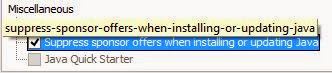
- Click the Advanced tab and go to the "Miscellaneous" section at the bottom.
- Check the box by the “Suppress sponsor offers when installing or updating Java” option and click OK.
Windows XP
For information on Java support for Windows XP, organizations and individuals who must continue using Windows XP and have Java installed are referred to the Oracle blog post, The future of Java on Windows XP (Henrik on Java).Update
If Java is still installed on your computer, it is recommended that this update be applied as soon as possible due to the threat posed by a successful attack.Download Information
Download link: Java SE 8u65Java SE 8u66 can be found here. Select the appropriate version for your operating system.
Verify your version: http://www.java.com/en/download/testjava.jsp
Notes:
- UNcheck any pre-checked toolbar and/or software options presented with the update. They are not part of the software update and are completely optional.
- Starting with Java SE 7 Update 21 in April 2013, all Java Applets and Web Start Applications should be signed with a trusted certificate. It is not recommended to run untrusted/unsigned Certificates. See How to protect your computer against dangerous Java Applets
Critical Patch Updates
For Oracle Java SE Critical Patch Updates, the next scheduled dates are as follows:- 19 January 2016
- 19 April 2016
- 19 July 2016
- 18 October 2016
Java Security Recommendations
For those people who have desktop applications that require Java and cannot uninstall it, Java can now be disabled in Internet Explorer. See Microsoft Fix it to Disable Java in Internet Explorer.1) In the Java Control Panel, at minimum, set the security to high.
2) Keep Java disabled until needed. Uncheck the box "Enable Java content in the browser" in the Java Control Panel.

3) If you use Firefox or Pale Moon, install NoScript and only allow Java on those sites where it is required.
Instructions on removing older (and less secure) versions of Java can be found at http://java.com/en/download/faq/remove_olderversions.xml
References
- Java SE 8 Update Release Notes
- Java, The Never-Ending Saga
- Oracle Critical Patch Update Advisory
- Oracle Quality Assurance Blog
- Critical Patch Updates and Security Alerts

Remember - "A day without laughter is a day wasted."
May the wind sing to you and the sun rise in your heart...
Go to link Download

Friday, January 13, 2017
Off to g malaysia and GDG DevFest KL 2012 3 4 October 2012
Off to g malaysia and GDG DevFest KL 2012 3 4 October 2012

Dear Khirulnizam Abd Rahman,
g|malaysia 2012 – confirmation
Youve got a spot for g|Malaysias Business, Marketing, Government and Entrepreneur Day on October 3!
Congratulations, you are confirmed to attend g|Malaysia! Over a dozen Googlers from around the world are looking forward to meeting you.
Please read the following information carefully as it contains important details about the event.
Day 1: Business, Marketing, Government and Entrepreneur Day
This day will give you the chance to learn more about our most popular business products - you will learn how to get online with Google+ Pages and Google Maps, how to make your business more efficient with Google Apps, how to improve your website, and much more! Pleasereview the full agenda so you know which sessions you would like to attend.
Our day will kick-off with a keynote from Sajith Sivanandan, Country Manager, Malaysia at Google, and after an invigorating morning, the day will continue with talks on YouTube, Google Maps,AdSense, Analytics and more. Make sure you arrive early and plan to stay until closing.
Meet the Google Team!
Familiarize yourself with the Google Team coming to g|Malaysia! Start interacting with them on Google+ and add them to your Google+ circles! Follow the speakers covering your favorite topics. See the Google Team page for links to the speakers Google+ profiles.
More about g|Malaysia on Google+
Share your excitement and follow the buzz by using the event hashtag #gmalaysia on Google+!Don’t have a Google+ account? Join the community today!
Date: October 3
Time: 09:00-18:00
Location: Berjaya Times Square Hotel,Kuala Lumpur
Doors will open at 08:00.
Please make sure you arrive early to get your badge and program before the start of the event.
For more information, visit our website or contact us at gdays-sea@google.com.
See you soon!
The g|Malaysia team
GDG DevFest KL 2012

Dear Khirulnizam Abd Rahman,
You are confirmed!
This email confirms your registration for the 3rd GDG DevFest Kuala Lumpur on 4 October 2012.
The event will be held at Level 14, Berjaya Times Square Hotel & Convention Centre in Kuala Lumpur.
The event will start at 9.30AM.
Registration begins at 8.00AM.
Please bring along this email to the registration booth to get your passes.
Please bring along your own laptop, power extensions (if you may) and backup internet (if all fails) for the codelab session.
For more information, please visithttp://devfestkl.appspot.com
Sincerely,
Nazrul Kamaruddin
Community Manager,
Google Developer Group Kuala Lumpur
Go to link Download