Wednesday, May 10, 2017
Oracle Java Quarterly Critical Security Update January 2016
Oracle Java Quarterly Critical Security Update January 2016

Oracle released the scheduled critical security updates for its Java SE Runtime Environment software and, once again, released a subsequent update that includes "bug fixes".
Unwanted "Extras"
Although most people do not need Java on their computer, there are some programs and games that require Java. In the event you need to continue using Java, How-to Geek discovered a little-known and unpublicized option in the Java Control Panel to suppress the offers for the pre-checked unwanted extras that Oracle has long included with the updates. Although the Ask Toolbar has been removed, tha does not preclude the pre-checked option for some other unnecessary add-on.Do the following to suppress the sponsor offers:
- Launch the Windows Start menu
- Click on Programs
- Find the Java program listing
- Click Configure Java to launch the Java Control Panel
- Click the Advanced tab and go to the "Miscellaneous" section at the bottom.
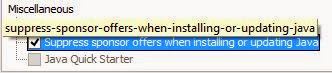
- Check the box by the “Suppress sponsor offers when installing or updating Java” option and click OK.
Windows XP
For information on Java support for Windows XP, organizations and individuals who must continue using Windows XP and have Java installed are referred to the Oracle blog post, The future of Java on Windows XP (Henrik on Java).Update
If Java is still installed on your computer, it is recommended that this update be applied as soon as possible due to the threat posed by a successful attack.Download Information
Download link: Java SE 8u71Java SE 8u72 can be found here. Select the appropriate version for your operating system.
Verify your version: http://www.java.com/en/download/testjava.jsp
Notes:
- UNcheck any pre-checked toolbar and/or software options presented with the update. They are not part of the software update and are completely optional.
- Starting with Java SE 7 Update 21 in April 2013, all Java Applets and Web Start Applications should be signed with a trusted certificate. It is not recommended to run untrusted/unsigned Certificates. See How to protect your computer against dangerous Java Applets
Critical Patch Updates
For Oracle Java SE Critical Patch Updates, the next scheduled dates are as follows:- 19 April 2016
- 19 July 2016
- 18 October 2016
- 17 January 2017
Java Security Recommendations
For those people who have desktop applications that require Java and cannot uninstall it, Java can now be disabled in Internet Explorer. See Microsoft Fix it to Disable Java in Internet Explorer.1) In the Java Control Panel, at minimum, set the security to high.
2) Keep Java disabled until needed. Uncheck the box "Enable Java content in the browser" in the Java Control Panel.

3) If you use Firefox or Pale Moon, install NoScript and only allow Java on those sites where it is required.
Instructions on removing older (and less secure) versions of Java can be found at http://java.com/en/download/faq/remove_olderversions.xml
References
- Java SE 8u71 Update Release Notes
- Java SE 8u72 Update Release Notes
- Java, The Never-Ending Saga
- Oracle Critical Patch Update Advisory
- Oracle Quality Assurance Blog
- Critical Patch Updates and Security Alerts

Remember - "A day without laughter is a day wasted."
May the wind sing to you and the sun rise in your heart...
Go to link Download

Friday, April 28, 2017
Oracle Java Quarterly Security Update October 2015
Oracle Java Quarterly Security Update October 2015
Oracle released the scheduled critical security updates for its Java SE Runtime Environment software along with a subsequent update that includes "bug fixes".
Unwanted "Extras"
Although most people do not need Java on their computer, there are some programs and games that require Java. In the event you need to continue using Java, How-to Geek discovered a little-known and unpublicized option in the Java Control Panel to suppress the offers for the pre-checked unwanted extras that Oracle has long included with the updates. Although the Ask Toolbar has been removed, tha does not preclude the pre-checked option for some other unnecessary add-on.Do the following to suppress the sponsor offers:
- Launch the Windows Start menu
- Click on Programs
- Find the Java program listing
- Click Configure Java to launch the Java Control Panel
- Click the Advanced tab and go to the "Miscellaneous" section at the bottom.
- Check the box by the “Suppress sponsor offers when installing or updating Java” option and click OK.
Windows XP
For information on Java support for Windows XP, organizations and individuals who must continue using Windows XP and have Java installed are referred to the Oracle blog post, The future of Java on Windows XP (Henrik on Java).Update
If Java is still installed on your computer, it is recommended that this update be applied as soon as possible due to the threat posed by a successful attack.Download Information
Download link: Java SE 8u65Java SE 8u66 can be found here. Select the appropriate version for your operating system.
Verify your version: http://www.java.com/en/download/testjava.jsp
Notes:
- UNcheck any pre-checked toolbar and/or software options presented with the update. They are not part of the software update and are completely optional.
- Starting with Java SE 7 Update 21 in April 2013, all Java Applets and Web Start Applications should be signed with a trusted certificate. It is not recommended to run untrusted/unsigned Certificates. See How to protect your computer against dangerous Java Applets
Critical Patch Updates
For Oracle Java SE Critical Patch Updates, the next scheduled dates are as follows:- 19 January 2016
- 19 April 2016
- 19 July 2016
- 18 October 2016
Java Security Recommendations
For those people who have desktop applications that require Java and cannot uninstall it, Java can now be disabled in Internet Explorer. See Microsoft Fix it to Disable Java in Internet Explorer.1) In the Java Control Panel, at minimum, set the security to high.
2) Keep Java disabled until needed. Uncheck the box "Enable Java content in the browser" in the Java Control Panel.
3) If you use Firefox or Pale Moon, install NoScript and only allow Java on those sites where it is required.
Instructions on removing older (and less secure) versions of Java can be found at http://java.com/en/download/faq/remove_olderversions.xml
References
- Java SE 8 Update Release Notes
- Java, The Never-Ending Saga
- Oracle Critical Patch Update Advisory
- Oracle Quality Assurance Blog
- Critical Patch Updates and Security Alerts
Remember - "A day without laughter is a day wasted."
May the wind sing to you and the sun rise in your heart...
Go to link Download
Saturday, April 1, 2017
Oracle Java Critical Security Update
Oracle Java Critical Security Update
Oracle released the scheduled critical security updates for its Java SE Runtime Environment software.
This is a Critical Patch Update that affects Oracle Java SE, versions 5.0u71, 6u81, 7u67, 8u20. From The Assurance Blog:
"Out of the 154 vulnerabilities fixed with today’s Critical Patch Update release, 31 are for the Oracle Database. All but 3 of these database vulnerabilities are related to features implemented using Java in the Database, and a number of these vulnerabilities have received a CVSS Base Score of 9.0."
Unwanted "Extras"
Oracle has long included pre-checked options with the updates. Although most people do not need Java on their computer, there are some programs and games that require Java. In the event you need to continue using Java, How-to Geek discovered a little-known and unpublicized option in the Java Control Panel to suppress the offers for the pre-checked unwanted extras.- Launch the Windows Start menu
- Click on Programs
- Find the Java program listing
- Click Configure Java to launch the Java Control Panel
- Click the Advanced tab and go to the "Miscellaneous" section at the bottom.
- Check the box by the “Suppress sponsor offers when installing or updating Java” option and click OK.
Windows XP
There has been a lot of recent controversy regarding Java updates for Windows XP. While Windows XP has reached end of life, Java 7 will continue to be updated until April, 2015.Thus, organizations and individuals who must continue using Windows XP and have Java installed can also continue getting updates for Java 7. It is noted, however, that if an issue arises that is specific to Windows XP, Oracle is not required to and also may not be able to create a patch. For additional information, refer to the Oracle blog post, The future of Java on Windows XP (Henrik on Java).
Update
If Java is still installed on your computer, it is recommended that this update be applied as soon as possible due to the threat posed by a successful attack.Download Information
Download link: Java SE 8u25Verify your version: http://www.java.com/en/download/testjava.jsp
Notes:
- UNcheck any pre-checked toolbar and/or software options presented with the update. They are not part of the software update and are completely optional.
- Starting with Java SE 7 Update 21 in April 2013, all Java Applets and Web Start Applications should be signed with a trusted certificate. It is not recommended to run untrusted/unsigned Certificates. See How to protect your computer against dangerous Java Applets
Critical Patch Updates
For Oracle Java SE Critical Patch Updates, the next scheduled dates are as follows:- 20 January 2015
- 14 April 2015
- 14 July 2015
- 20 October 2015
Java Security Recommendations
For those people who have desktop applications that require Java and cannot uninstall it, Java can now be disabled in Internet Explorer. See Microsoft Fix it to Disable Java in Internet Explorer.1) In the Java Control Panel, at minimum, set the security to high.
2) Keep Java disabled until needed. Uncheck the box "Enable Java content in the browser" in the Java Control Panel.
 |
| (Image via Sophos Naked Security Blog) |
3) If you use Firefox, install NoScript and only allow Java on those sites where it is required.
Instructions on removing older (and less secure) versions of Java can be found at http://java.com/en/download/faq/remove_olderversions.xml
References
- Java SE 8 Update Release Notes
- Java, The Never-Ending Saga
- Oracle Quality Assurance Blog
- Oracle Critical Patch Update Advisory October 2014
- Oracle Critical Patch Advisory
Remember - "A day without laughter is a day wasted."
May the wind sing to you and the sun rise in your heart...
Go to link Download
Sunday, February 26, 2017
Oracle Java Quarterly Security Updates July 2015
Oracle Java Quarterly Security Updates July 2015
Oracle released the scheduled critical security updates for its Java SE Runtime Environment software.
Unwanted "Extras"
Although most people do not need Java on their computer, there are some programs and games that require Java. In the event you need to continue using Java, How-to Geek discovered a little-known and unpublicized option in the Java Control Panel to suppress the offers for the pre-checked unwanted extras that Oracle has long included with the updates. Although the Ask Toolbar has been removed, tha does not preclude the pre-checked option for some other unnecessary add-on.Do the following to suppress the sponsor offers:
- Launch the Windows Start menu
- Click on Programs
- Find the Java program listing
- Click Configure Java to launch the Java Control Panel
- Click the Advanced tab and go to the "Miscellaneous" section at the bottom.
- Check the box by the “Suppress sponsor offers when installing or updating Java” option and click OK.
Windows XP
For information on Java support for Windows XP, organizations and individuals who must continue using Windows XP and have Java installed are referred to the Oracle blog post, The future of Java on Windows XP (Henrik on Java).Update
If Java is still installed on your computer, it is recommended that this update be applied as soon as possible due to the threat posed by a successful attack.Download Information
Download link: Java SE 8u51Verify your version: http://www.java.com/en/download/testjava.jsp
Notes:
- UNcheck any pre-checked toolbar and/or software options presented with the update. They are not part of the software update and are completely optional.
- Starting with Java SE 7 Update 21 in April 2013, all Java Applets and Web Start Applications should be signed with a trusted certificate. It is not recommended to run untrusted/unsigned Certificates. See How to protect your computer against dangerous Java Applets
Critical Patch Updates
For Oracle Java SE Critical Patch Updates, the next scheduled dates are as follows:- 20 October 2015
- 19 January 2016
- 19 April 2016
Java Security Recommendations
For those people who have desktop applications that require Java and cannot uninstall it, Java can now be disabled in Internet Explorer. See Microsoft Fix it to Disable Java in Internet Explorer.1) In the Java Control Panel, at minimum, set the security to high.
2) Keep Java disabled until needed. Uncheck the box "Enable Java content in the browser" in the Java Control Panel.
3) If you use Firefox or Pale Moon, install NoScript and only allow Java on those sites where it is required.
Instructions on removing older (and less secure) versions of Java can be found at http://java.com/en/download/faq/remove_olderversions.xml
References
- Java SE 8 Update Release Notes
- Java, The Never-Ending Saga
- Oracle Quality Assurance Blog
- Critical Patch Updates and Security Alerts
Remember - "A day without laughter is a day wasted."
May the wind sing to you and the sun rise in your heart...
Go to link Download
Thursday, February 2, 2017
Oracle Java Quarterly Security Update Released
Oracle Java Quarterly Security Update Released
Oracle released the scheduled critical security updates for its Java SE Runtime Environment software.
It is important to also note that this release will be the last Oracle JDK 7 publicly available update. For more information, and details on how to receive longer term support for Oracle JDK 7, please see the Oracle Java SE Support Roadmap.
Unwanted "Extras"
Oracle has long included pre-checked options with the updates. Although most people do not need Java on their computer, there are some programs and games that require Java. In the event you need to continue using Java, How-to Geek discovered a little-known and unpublicized option in the Java Control Panel to suppress the offers for the pre-checked unwanted extras.- Launch the Windows Start menu
- Click on Programs
- Find the Java program listing
- Click Configure Java to launch the Java Control Panel
- Click the Advanced tab and go to the "Miscellaneous" section at the bottom.
- Check the box by the “Suppress sponsor offers when installing or updating Java” option and click OK.
Windows XP
For information on Java support for Windows XP, organizations and individuals who must continue using Windows XP and have Java installed are referred to the Oracle blog post, The future of Java on Windows XP (Henrik on Java).Update
If Java is still installed on your computer, it is recommended that this update be applied as soon as possible due to the threat posed by a successful attack.Download Information
Download link: Java SE 8u45Verify your version: http://www.java.com/en/download/testjava.jsp
Notes:
- UNcheck any pre-checked toolbar and/or software options presented with the update. They are not part of the software update and are completely optional.
- Starting with Java SE 7 Update 21 in April 2013, all Java Applets and Web Start Applications should be signed with a trusted certificate. It is not recommended to run untrusted/unsigned Certificates. See How to protect your computer against dangerous Java Applets
Critical Patch Updates
For Oracle Java SE Critical Patch Updates, the next scheduled dates are as follows:- 14 April 2015
- 14 July 2015
- 20 October 2015
- 19 January 2016
Java Security Recommendations
For those people who have desktop applications that require Java and cannot uninstall it, Java can now be disabled in Internet Explorer. See Microsoft Fix it to Disable Java in Internet Explorer.1) In the Java Control Panel, at minimum, set the security to high.
2) Keep Java disabled until needed. Uncheck the box "Enable Java content in the browser" in the Java Control Panel.
|
| (Image via Sophos Naked Security Blog) |
3) If you use Firefox or Pale Moon, install NoScript and only allow Java on those sites where it is required.
Instructions on removing older (and less secure) versions of Java can be found at http://java.com/en/download/faq/remove_olderversions.xml
References
- Java SE 8 Update Release Notes
- Oracle Critical Patch Update - January 2015
- Java, The Never-Ending Saga
- Oracle Quality Assurance Blog
- Critical Patch Updates and Security Alerts
Remember - "A day without laughter is a day wasted."
May the wind sing to you and the sun rise in your heart...
Go to link Download
Monday, December 19, 2016
Oracle VM Virtual Box
Oracle VM Virtual Box
VirtualBox (now called as ORACLE VM Virtualbox) is an extremely feature rich, high performance powerful x86 and 
VirtualBox supports a wide array of platforms including Windows, Linux, Macintosh and OpenSolaris hosts and supports a large number of guest operating systems including but not limited to Windows (NT 4.0, 2000, XP, Server 2003, Vista, Windows 7), DOS/Windows 3.x, Linux (2.4 and 2.6), Solaris and OpenSolaris, and OpenBSD.
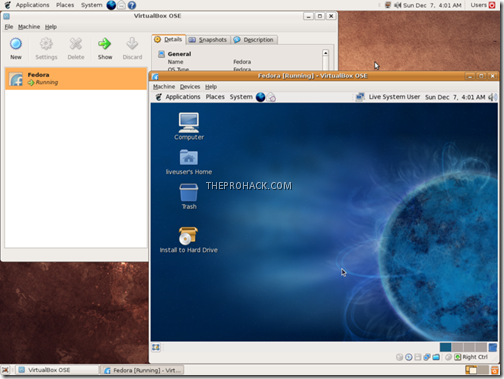
VirtualBox is being actively developed with frequent releases and has an ever growing list of features, supported guest operating systems and platforms it runs on. I guess with VirtualBox on board with ORACLE, VBox has got a quite bright future (unless Oracle doesnt starts proprietary shit with it).
Meanwhile, you can download it from here
Like This post ? You can buy me a Beer :)
Posted by XERO. ALL RIGHTS RESERVED.
Go to link Download
Monday, December 12, 2016
Oracle Java Quarterly Security Update April 2016
Oracle Java Quarterly Security Update April 2016
Following two out-of-band security updates since the last quarterly update, Oracle released the scheduled critical security updates for its Java SE Runtime Environment software and, once again, released two versions.
Java Version 8 Update 91 contains important security fixes and Java Version 8 Update 92 is described as a patch-set update, which includes the updates in Version 8u91 plus the additional features described in the release notes.
Unwanted "Extras"
Although most people do not need Java on their computer, there are some programs and games that require Java. In the event you need to continue using Java, How-to Geek discovered a little-known and unpublicized option in the Java Control Panel to suppress the offers for the pre-checked unwanted extras that Oracle has long included with the updates. Although the Ask Toolbar has been removed, tha does not preclude the pre-checked option for some other unnecessary add-on.Do the following to suppress the sponsor offers:
- Launch the Windows Start menu
- Click on Programs
- Find the Java program listing
- Click Configure Java to launch the Java Control Panel
- Click the Advanced tab and go to the "Miscellaneous" section at the bottom.
- Check the box by the “Suppress sponsor offers when installing or updating Java” option and click OK.
Windows XP
For information on Java support for Windows XP, organizations and individuals who must continue using Windows XP and have Java installed are referred to the Oracle blog post, The future of Java on Windows XP (Henrik on Java).Update
If Java is still installed on your computer, it is recommended that this update be applied as soon as possible due to the threat posed by a successful attack.Download Information
Download link: Java SE 8u91Java SE 8u92 can be found here. Select the appropriate version for your operating system.
Verify your version: http://www.java.com/en/download/testjava.jsp
Notes:
- UNcheck any pre-checked toolbar and/or software options presented with the update. They are not part of the software update and are completely optional.
- Starting with Java SE 7 Update 21 in April 2013, all Java Applets and Web Start Applications should be signed with a trusted certificate. It is not recommended to run untrusted/unsigned Certificates. See How to protect your computer against dangerous Java Applets
Critical Patch Updates
For Oracle Java SE Critical Patch Updates, the next scheduled dates are as follows:- 19 July 2016
- 18 October 2016
- 17 January 2017
- 18 April 2017
Java Security Recommendations
For those people who have desktop applications that require Java and cannot uninstall it, Java can now be disabled in Internet Explorer. See Microsoft Fix it to Disable Java in Internet Explorer.1) In the Java Control Panel, at minimum, set the security to high.
2) Keep Java disabled until needed. Uncheck the box "Enable Java content in the browser" in the Java Control Panel.
Instructions on removing older (and less secure) versions of Java can be found at http://java.com/en/download/faq/remove_olderversions.xml
References
- Java SE 8u91 Update Release Notes
- Java SE 8u92 Update Release Notes
- Java, The Never-Ending Saga
- Oracle Critical Patch Update Advisory
- Oracle Quality Assurance Blog
- Critical Patch Updates and Security Alerts

Remember - "A day without laughter is a day wasted."
May the wind sing to you and the sun rise in your heart...
Go to link Download
On Vacation but Java updates from Oracle and Apple Be sure to have the UNmessed up Apple Java update!!! and Adobe Flash Update
On Vacation but Java updates from Oracle and Apple Be sure to have the UNmessed up Apple Java update!!! and Adobe Flash Update

Im on a break while I work on other things. But here is some quickie news. I expect, if youre a regular reader, you know how to dig up the URLs and CVE reports by now.
I) MASSIVE CRITICAL Java update from both Oracle and Apple, including 40 (FORTY) security patches. Apples update is for Java version 1.6 only, the part of Java included in OS X. The update is for OS X 10.6 - 10.8.
II) Apple MESSED-UP their original Java update release, which was labeled "JavaForOSX2013-003". This mess KILLED Java and must be updated with what replaced it: "JavaForOSX2013-004". From my experience, Software Update did NOT provide me with the updated version. I had to grab oo4 myself and apply it myself. You may have to do so as well.
Here is an article to help you sort out whether you got STUNG by Apples mess or not, and how to clean it up. Thank you to 9to5Mac.com:


Go to link Download
Tuesday, November 1, 2016
Oracle VM VirtualBox v4 3 8 Build 92456 Virtualizer App
Oracle VM VirtualBox v4 3 8 Build 92456 Virtualizer App

Download Oracle VM VirtualBox v4.3.8 Build 92456
Halo sobat semua! pada kesempatan sebelumnya saya sudah membagikan sebuah aplikasi untuk menjalankan aplikasi android di Windows yaitu BlueStack Offline Installer, nah kali ini saya juga akan membagikan sebuah aplikasi yang fungsinya hampir mirip dengan aplikasi Bluestack tadi karena bisa digunakan untuk menjalankan yang tidak bisa dijalankan yaitu Oracle VM VirtualBox. Dengan aplikasi Open Source VirtualBox ini sobat bisa menjalankan sistem operasi lain di sistem operasi yang sobat gunakan! lebih tepatnya OS didalam OS. Jadi dengan aplikasi ini sobat bisa mencoba Linux di Windows, Ubuntu di Windows, Android di Windows dan Solaris OS di Windows bahkan sebaliknya. Tampilannya sih simple karena OS tadi kita hanya divirtualisasikan dalam jendela VirtualBox ini. Jadi tidak perlu otak-atik sistem komputer sobat. Untuk menggunakannya sobat juga memerlukan sebuah file ISO master OS untuk divirtualisasi terlebih dahulu.
Screenshot:

Download Link:
Download Oracle Virtual Box for Windows (102 MB)
Link Alternatif
Go to link Download