Showing posts with label codes. Show all posts
Showing posts with label codes. Show all posts
Sunday, April 16, 2017
Nokia Security Codes for Hard Reset Soft Reset etc
Nokia Security Codes for Hard Reset Soft Reset etc

• How to check the running applications on your S60 device: simply press the menu key for a second. You can move up and down to an application or close it with the ‘C’ key.
• How to spare space on the mobile’s memory: You can store your messages on the storage card this way: Go to message settings, other memory in use and choose your storage card instead of phone memory.
• Some symbian series 60 secret codes:
Display your IMEI number by pressing *#06#
Display your firmware version by pressing *#0000#
Display your Bluetooth address by pressing *#2820#
• How to reset your series 60 device
You can soft reset your device with the code *#7780# + security code {12345 if you didn’t change it} so that your device will be back to factory settings. Your personal data will not be erased.
You can hard reset your device with the code *#7370# + security code {12345 if you didn’t change it} so that your device will be as the first day-all data are deleted because the phone is formatted!
• If your phone is seriously crashed and won’t boot, you can perform the same hard reset this way:
Make sure your battery is fully charged
Backup your personal data to your computer or an MMC storage card.
Switch off your nokia 3250.
Press and hold 3 keys: green dial key, * star key, no. 3 key on keypad and then press the power on/off to switch on the nokia 3250. Remember, do not let go the 3. Press and hold keys until you see the formatting screen. After a few minutes when the process is over , your nokia 3250 will be back to the original delivered system.
Go to link Download

Tuesday, March 7, 2017
Multimedia Dictionary app for Android – with Source codes
Multimedia Dictionary app for Android – with Source codes
I decided to publish the following source code of a Multimedia Dictionary app for Android. The apps is a dictionary of the following languages, Malay, Arabic and English. All the word entries are available in the locally (sqlite), however we do not have the complete word list.
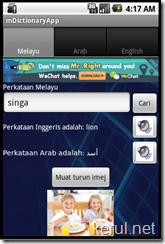

This code is specifically designed to support only Android 2.1, 2.2 and 2.3. This is due to lack of Arabic character support in the listed Android version. And there ‘s a special treatment to the Arabic characters which we found quite complicated. It won’t run beautifully on the Android 3.0 and above.
Sorry for the lack of documentation, however if you’re familiar with Java in Android, it actually simple. I’ll do further documentation later.
You may somehow revamp the apps, or do what ever you want. I would like to However make only one request, please do not remove the advertisement in the main screen.
To test the Arabic input, you need to have the Arabic keyboard – use this http://bit.ly/ask1-1. Not sure with other Arabic keyboard. If you need to install the keyboard APK in the emulator, use this tutorial - http://blog.kerul.net/2012/08/how-to-install-apk-files-on-android.html
->Source codes – download here http://bit.ly/kamus-code
->APK file – download here http://bit.ly/kamus-apk
File structure;
 | Java Source codes main.java – the main that calls all thre tabs ArabicReshaper.java, ArabicUtilities.java a2m.java e2ma.java m2a.java MyDBHelper.java Layout main.xml a2m.xml e2ma.xml m2a.xml |
The English to Malay-Arabic layout;

<?xml version="1.0" encoding="utf-8"?>
<TableLayout >="http://schemas.android.com/apk/res/android"
 android:orientation="vertical"
 android:background="@drawable/bd"
 android:layout_width="fill_parent"
 android:layout_height="fill_parent"
 android:stretchColumns="1"
 >
 <TableRow
 android:id="@+id/tableAdMob"
 android:layout_width="match_parent"
 android:layout_height="wrap_content" >
 <com.google.ads.AdView

 android_id="@+id/adView1"
 android_layout_width="fill_parent"
 android_layout_height="wrap_content"
 ads_adSize="BANNER"
 ads_adUnitId="738a44d913034b9f"
 android_layout_column="0"
 android_layout_span="3"
 />
 </TableRow>
 <TableRow>
 <TextView android:text="English word"
 android:textColor="#ffffff"
 android:layout_width="fill_parent"
 android:layout_height="wrap_content" />
 </TableRow>
 <TableRow>
 <EditText android:text=""
 android:layout_column="0"
 android:id="@+id/txtenglish"
 android:layout_width="fill_parent"
 android:layout_height="wrap_content"
 android:layout_span="2" />
 <Button android:text="Search"
 android:layout_column="2"
 android:id="@+id/btncari"
 android:layout_width="wrap_content"
 android:layout_height="wrap_content" />
 </TableRow>
 <TableRow>
 <TextView android:text="Malay word here"
 android:id="@+id/tvmelayu"
 android:layout_column="0"
 android:textColor="#ffffff"
 android:layout_width="wrap_content"
 android:layout_height="wrap_content" />
 <Button android:text=""
 android:layout_column="2"
 android:drawableLeft="@drawable/sound"
 android:id="@+id/btnsebutan"
 android:layout_width="wrap_content"
 android:layout_height="wrap_content"
 />
 </TableRow>
 <TableRow>
 <TextView android:text="Arabic word here"
 android:id="@+id/tvarab"
 android:layout_column="0"
 android:textColor="#ffffff"
 android:layout_width="wrap_content"
 android:layout_height="wrap_content" />
 <Button android:text=""
 android:layout_column="2"
 android:drawableLeft="@drawable/sound"
 android:id="@+id/btnsebutan1"
 android:layout_width="wrap_content"
 android:layout_height="wrap_content"
 />
 </TableRow>

 <LinearLayout android:gravity="center_horizontal">

 <Button android:text="Download image"
 android:id="@+id/btndownimej"
 android:layout_width="wrap_content"
 android:layout_height="wrap_content"
 />

 </LinearLayout>


 <TableRow android:gravity="center_horizontal">
 <ImageView
 android:id="@+id/image1"
 android:layout_height="100sp"
 android:layout_width="100sp"
 />
 </TableRow>
 <TableRow>
 <TextView android:text=" "
 android:textColor="#ffffff"
 android:layout_width="fill_parent"
 android:layout_height="wrap_content" />
 </TableRow>

</TableLayout>
The English to Malay-Arabic – Java code;
package net.kerul.mdictionary;
import java.io.IOException;
import java.io.InputStream;
import java.net.URL;
import com.google.ads.AdRequest;
import com.google.ads.AdView;
import android.app.Activity;
import android.database.Cursor;
import android.database.sqlite.SQLiteDatabase;
import android.graphics.Typeface;
import android.graphics.drawable.Drawable;
import android.media.MediaPlayer;
import android.media.MediaPlayer.OnCompletionListener;
import android.os.Bundle;
import android.util.Log;
import android.view.View;
import android.view.View.OnClickListener;
import android.widget.Button;
import android.widget.EditText;
import android.widget.ImageView;
import android.widget.TextView;
import android.widget.Toast;
public class e2ma extends Activity implements OnClickListener {
// widget - txtmelayu, btncari, tvarab, image, btnsebutan
protected EditText txtenglish;
protected Button btncari, btndownimej, btnsebutan,btnsebutan1;
protected TextView tvmelayu,tvarab;
protected ImageView image1;
protected MyDBHelper myDBHelper;
// protected Cursor cursor;
protected SQLiteDatabase db;
protected String imejurl, voiceurl;
protected Drawable drawable;
protected String va,ia,vm;//to hold sound name publicly
private AdView adView;
@Override
public void onCreate(Bundle savedInstanceState) {
super.onCreate(savedInstanceState);
//kat server KUIS
imejurl="http://www.kuis.edu.my/iame/ommar/image/";
voiceurl="http://www.kuis.edu.my/iame/ommar/voice/";
setContentView(R.layout.e2ma);
txtenglish= (EditText) findViewById(R.id.txtenglish);
txtenglish.requestFocus();
btncari = (Button) findViewById(R.id.btncari);
btncari.setOnClickListener(this);
//tvarab = (TextView) findViewById(R.id.tvarab);
//tvarab.setTypeface(tfarabic);
tvmelayu = (TextView) findViewById(R.id.tvmelayu);
tvarab = (TextView) findViewById(R.id.tvarab);
// the image download button
btndownimej = (Button) findViewById(R.id.btndownimej);
btndownimej.setEnabled(false);// disable button
btndownimej.setOnClickListener(this);
//define image drawer
image1 = (ImageView) findViewById(R.id.image1);
image1.setImageResource(R.drawable.icon);
//image1.setAdjustViewBounds(true); // set the ImageView bounds to match
// the Drawables dimensions
btnsebutan = (Button) findViewById(R.id.btnsebutan);
btnsebutan.setEnabled(false);// disable button
btnsebutan.setOnClickListener(this);
// Log.i("*****", "create UI Melayu-Arab");
btnsebutan1 = (Button) findViewById(R.id.btnsebutan1);
btnsebutan1.setEnabled(false);// disable button
btnsebutan1.setOnClickListener(this);
// database initial
myDBHelper = new MyDBHelper(this);
db = myDBHelper.getReadableDatabase();
//admob widget - private AdView adView;
adView = (AdView)findViewById(R.id.adView1);
adView.loadAd(new AdRequest());
}
public void onClick(View v) {
String melayu="", imeja="", voicem="", voicea;
String bi,uarab="";
//jmCursor cmelayu;
Cursor cjoiner;
Cursor cbi, carab,cmelayu;
switch (v.getId()) {
case R.id.btncari:
bi=txtenglish.getText().toString().trim().toLowerCase();
// tvarab.setText(ArabicUtilities.reshape(uarab));
//search for the arabic word
String qbi="SELECT * FROM english where kataeng="+bi+";";
Log.i("-----search table english---- ",qbi);
//tvmelayu.setText(qarab);
cbi = db.rawQuery(qbi, null);
if(cbi.getCount()!=0){
cbi.moveToFirst();
//tvmelayu.setText("Perkataan "+bi+" ada: "+cbi.getString(0).toString());
//get malay word in joiner table
String qjoiner ="SELECT * FROM melayuarab where kataeng="+bi+";";
Log.i("-----search table joiner----- ",qjoiner);
cjoiner=db.rawQuery(qjoiner, null);
if(cjoiner.getCount()!=0){
cjoiner.moveToFirst();//go to first row
melayu=cjoiner.getString(0).toString();
uarab=cjoiner.getString(2).toString();
tvmelayu.setText("Perkataan Melayu Adalah: "+melayu);
tvarab.setTypeface(Typeface.createFromAsset(getAssets(),"dejavusans.ttf"));
tvarab.setText(ArabicUtilities.reshape("Perkataan Arab adalah: "+uarab));
}else{
tvmelayu.setText("Perkataan "+melayu+" tiada dalam joiner");
tvarab.setText("Perkataan "+uarab+" tiada dalam joiner");
}
//get malay details in melayu table
//String qmelayu ="SELECT * FROM melayu where katamelayu="+melayu+";";
//Log.i("-----search table melayu---- ",qmelayu);
//cmelayu=db.rawQuery(qmelayu, null);
//cmelayu.moveToFirst();//go to first row
//imeje=ie=cbi.getString(3).toString();
//Log.i("-----display---- ",imejm);
//voicee=ve=cbi.getString(4).toString();
//if word found and voice also available, activate "Sebutan" button
String qmelayu ="SELECT * FROM melayu where katamelayu="+melayu+";";
//Log.i("-----search table melayu---- ",qmelayu);
cmelayu=db.rawQuery(qmelayu, null);
cmelayu.moveToFirst();//go to first row
//Log.i("-----display---- ",imejm);
voicem=vm=cmelayu.getString(4).toString();
//if word found and voice also available, activate "Sebutan" button
if(voicem!=null){
btnsebutan.setEnabled(true);
vm=cmelayu.getString(4).toString();
}else{
btnsebutan.setEnabled(false);
}
String qarab ="SELECT * FROM arab where ukataarab="+uarab+";";
Log.i("-----search table arab---- ",qarab);
carab=db.rawQuery(qarab, null);
carab.moveToFirst();//go to first row
imeja=ia=carab.getString(6).toString();
//Log.i("-----display---- ",imeja);
voicea=va=carab.getString(7).toString();
//tvarab.setText(uarab+", "+imeja+", "+voicea);
//reset font textview arab
//if word found and voice also available, activate "Sebutan" button
if(voicea!=null){
btnsebutan1.setEnabled(true);
va=carab.getString(7).toString();
}else{
btnsebutan1.setEnabled(false);
}
if(imeja!=null){
btndownimej.setEnabled(true);
ia=carab.getString(6).toString();
}else{
btnsebutan1.setEnabled(false);
}
}
else{
//tvarab.setText("Maaf, "+melayu+" tiada dalam pangkalan data");
Toast.makeText(getApplicationContext(), "Maaf, "+bi+" tiada dalam pangkalan data",Toast.LENGTH_SHORT).show();
//tvarab.setText(ArabicUtilities.reshape("Maaf, "+uarab+" tiada dalam pangkalan data"));
btnsebutan.setEnabled(false);
}
break;
case R.id.btndownimej:
if (ia==null ||ia=="notavailable.jpg"){
Toast.makeText(getApplicationContext(), "Sorry, the image is not yet available.",Toast.LENGTH_SHORT).show();
break;
}
//image download and display
drawable = LoadImageFromWebOperations(imejurl+ia);
image1.setImageDrawable(drawable);
break;
case R.id.btnsebutan://malay
if (vm==null ||vm=="notavailable.mp3"){
Toast.makeText(getApplicationContext(), "Sorry, the sound is not yet available.",Toast.LENGTH_SHORT).show();
break;
}
// Toast.makeText(getApplicationContext(), "you choose -",Toast.LENGTH_SHORT).show();
//sound download and play
MediaPlayer mp = new MediaPlayer();
try {
//mp.create(t ,R.raw.makana);
//Toast.makeText(m2a.this, "Downloading sound...", Toast.LENGTH_SHORT).show();
mp.setDataSource(voiceurl+vm);
Toast.makeText(e2ma.this, "Download voice "+voiceurl+vm, Toast.LENGTH_SHORT).show();
//Toast.makeText(m2a.this, "Playing sound ", Toast.LENGTH_SHORT).show();
mp.prepare();
mp.start();
} catch (IOException e) {
// TODO Auto-generated catch block
//String err=" file download error" + e.toString();
Toast.makeText(e2ma.this, "Download error!!! ", Toast.LENGTH_SHORT).show();
Log.i("------------",e.toString());
}
// i.e. react on the end of the music-file:
mp.setOnCompletionListener(new OnCompletionListener(){
// @Override
public void onCompletion(MediaPlayer arg0) {
// File has ended !!! <img src="http://www.anddev.org/images/smilies/wink.png" alt=";)" title="Wink" />
}
});
break;
case R.id.btnsebutan1://arabic
if (va==null ||va=="notavailable.mp3"){
Toast.makeText(getApplicationContext(), "Sorry, the sound is not yet available.",Toast.LENGTH_SHORT).show();
break;
}
// Toast.makeText(getApplicationContext(), "you choose -",Toast.LENGTH_SHORT).show();
//sound download and play
MediaPlayer mp1 = new MediaPlayer();
try {
//mp.create(t ,R.raw.makana);
//Toast.makeText(m2a.this, "Downloading sound...", Toast.LENGTH_SHORT).show();
mp1.setDataSource(voiceurl+va);
Toast.makeText(e2ma.this, "Download voice "+voiceurl+va, Toast.LENGTH_SHORT).show();
//Toast.makeText(m2a.this, "Playing sound ", Toast.LENGTH_SHORT).show();
mp1.prepare();
mp1.start();
} catch (IOException e) {
// TODO Auto-generated catch block
//String err=" file download error" + e.toString();
Toast.makeText(e2ma.this, "Download error!!! ", Toast.LENGTH_SHORT).show();
Log.i("------------",e.toString());
}
// i.e. react on the end of the music-file:
mp1.setOnCompletionListener(new OnCompletionListener(){
// @Override
public void onCompletion(MediaPlayer arg0) {
// File has ended !!! <img src="http://www.anddev.org/images/smilies/wink.png" alt=";)" title="Wink" />
}
});
break;
}
}
//this function is to handle image download from the web
private Drawable LoadImageFromWebOperations(String url){
try
{
Toast.makeText(this.getApplicationContext(), "Downloading image from " + url, Toast.LENGTH_SHORT).show();
InputStream is = (InputStream) new URL(url).getContent();
Drawable d = Drawable.createFromStream(is, "src name");
Toast.makeText(this.getApplicationContext(), "Download finish", Toast.LENGTH_SHORT).show();
retuGo to link Download
Thursday, February 16, 2017
NOKIA Phone Codes
NOKIA Phone Codes

Most of them are working well. I have tested. Enjoy!
*3370# Activate Enhanced Full Rate Codec (EFR) -
Your phone uses the best sound quality but talk time is reduced.
#3370# Deactivate Enhanced Full Rate Codec (EFR)
*#4720# Activate Half Rate Codec -
Your phone uses a lower quality sound but you should gain approx 30% more Talk Time
*#4720# Deactivate Half Rate Codec
*#0000# Displays your phones software version,
1st Line : Software Version, 2nd Line : Software Release Date, 3rd Line : Compression Type
*#9999# Phones software version if *#0000# does not work
*#06# For checking the International Mobile Equipment Identity (IMEI Number)
#pw+1234567890+1# Provider Lock Status. (use the "*" button to obtain the "p,w" and "+" symbols)
#pw+1234567890+2# Network Lock Status. (use the "*" button to obtain the "p,w" and "+" symbols)
#pw+1234567890+3# Country Lock Status. (use the "*" button to obtain the "p,w" and "+" symbols)
#pw+1234567890+4# SIM Card Lock Status. (use the "*" button to obtain the "p,w" and "+" symbols)
*#147# This lets you know who called you last (Only vodofone)
*#1471# Last call (Only vodofone)
*#21# Allows you to check the number that "All Calls" are diverted to
*#2640# Displays security code in use
*#30# Lets you see the private number
*#43# Allows you to check the "Call Waiting" status of your phone.
*#61# Allows you to check the number that "On No Reply" calls are diverted to
*#62# Allows you to check the number that "Divert If Unreachable (no service)" calls are diverted to
*#67# Allows you to check the number that "On Busy Calls" are diverted to
*#67705646# Removes operator logo on 3310 & 3330
*#73# Reset phone timers and game scores
*#746025625# (or: *#SIM0CLOCK#) Displays the SIM Clock status, if your phone supports this power saving feature "SIM Clock Stop Allowed", it means you will get the best standby time possible
*#7760# Manufactures code
*#7780# Restore factory settings
*#8110# Software version for the nokia 8110
*#92702689# (or: *#WAR0ANTY#) Displays - 1.Serial Number, 2.Date Made, 3.Purchase Date, 4.Date of last repair (0000 for no repairs), 5.Transfer User Data. To exit this mode you need to switch your phone off then on again
*#94870345123456789# Deactivate the PWM-Mem
**21*number# Turn on "All Calls" diverting to the phone number entered
**61*number# Turn on "No Reply" diverting to the phone number entered
**67*number# Turn on "On Busy" diverting to the phone number entered
12345 This is the default security code
press and hold # Lets you switch between lines
Gotch them from metacafe.
Source of http://www.myanmarnavy.com
Go to link Download
Saturday, December 17, 2016
Nokia Mobile Sets Secret Codes
Nokia Mobile Sets Secret Codes
 | ||
| Mobile Set: All Nokia Mobile Sets Use For: Default Security Code. Code: 12345 Mobile Set: Nokia Mobiles Use For: Turn On Enhanced Full Rate Codec. Code: *3370# Use For: Turn Off Enhanced Full Rate Codec. Code: *#3370# Use For: Turn On Half Rate Codec. Code: *4720# Use For: Turn Off Half Rate Codec. Code: *#4720# Use For: Show Software Version. Code: *#0000# Use For: Also For Show Software Version. Code: *#9999# Use For: Show IMEI (International Mobile Equipment Identity). Code: *#06# Use For: Show Lock Status of Your Nokia Mobile Set. Code: #pw+1234567890+1# Use For: Show Lock Status of Your SIM. Code: #pw+1234567890+4# Use For: Show Security Code of Your Mobile Phone. Code: *#2640# Use For: Reset Game Score And Timer. Code: *#73# Simlock info: * # 9 2 7 0 2 6 8 9 # [Nokia][ Nokia Symbians]
Heres how... in the inbox for example; u wanna delete multiple sms, simply hold the edit button, scroll down, and then, press c to delete the marked sms. The edit button can also b used to copy and past text in sms, simply hold it and scroll across, choose copy. pretty good for placing song names in ngages Tip 2 : Shit happens, on a smartphone, its inevitable u do something wrong, and this calls for a format of fone. to format the fone, press *#7370#, then enter the lock code, which is the sec code of the fone. NOTE : batt must b full, else if format is disrupted by low batt, consequences will b disatrous I heard the code *#7780# works too, pretty much the same i tink. for 6600 users, to format the fone, theres an alternative way. Press and hold <3>, <*>, and the buttons, then power on fone, keep holding on the 3 buttons, till u come to a format screen. tis method ONLY works on 6600, and need not enter the sec code. BUT sec code wun be reset to default 12345. There are two kinds of formatting: hard formatting and soft formatting ---------------------------------------------------------------------------------------------------------------------------------------------------- SOFT formatting: This does not realy format your phone (c-drive). It restores ini files from rom but preserves user data (photos, 3rd party apps etc). This is just a normal reset!! HOW? There are two ways to do a normal reset: 1) *#7780# (this seems to work only on S60 v6.1 and 7.0) 2) Go to Settings, General and scroll down to factorysettings (works on all S60 phones) ------------------------------------------------------------------------------------------------------------------------------------------------------------ HARD formatting: This reformats completely the C-drive. All applications and files stored on this drive will be lost and clean but default files will be rewritten. This is a deep reset. HOW? Again there are two ways: 1) *#7370# 2) When unable to startup your phone: press and hold the green (talk) key on the left + number 3 on the keypad + the * key and then turn the phone on. This trick works on every S60 v7.0 and it works fine on my 6630 too but without formatting screen... Tip 3 : TO NGAGE USERS; Did u know u can install .sis files simply using the cable given? Juz plug it in, place the .sis file anywhere on e: (the mmc), not in any folders, root of e:, disconnect, then look for it in manager. Tip 4: Save on battery and system memory being used by regulary checking the task manager which can be accessed by holding down the menu button!! Tip 5: Type *#06# to display your IMEI serial number, very valuable for the unlocking your phone to other sim cards... Tip 6: Save memory when installing apps, by installing over bluetooth. This can be done using the nokia phone suite and a bluetooth serial connection. Only works with .SIS files, so java still has to be sent to the phone, but will save space when using .SIS files. Tip 7: Operator logos Use a filemanager like FExplorer or SeleQ to add the folders: "c:/system/Apps/phone/oplogo". Add a .bmp picture to folder "oplogo" and restart your phone! The .bmp picture size needs to be: 97 x 25 pixels Tip 8: BlueJacking First up, you need to know what Bluetooth is. There are lots of types of modern devices that incorporate Bluetooth as one of their many features. PDAs, mobile phones and laptops are a few of these modern devices. Bluetooth means that Bluetooth enabled devices can send things like phonebook/address book contacts, pictures & notes to other Bluetooth enabled devices wirelessly over a range of about 10 metres. So, weve got past the boring part. Now, using a phone with Bluetooth, you can create a phonebook contact and write a message, eg. Hello, youve been bluejacked, in the Name field. Then you can search for other phones with Bluetooth and send that phonebook contact to them. On their phone, a message will popup saying "Hello, youve been bluejacked has just been received by Bluetooth" or something along those lines. For most victims they will have no idea as to how the message appeared on their phone. Tip 9: While you are viewing a picture in your phones gallery, press one of these shortcut keys (definitely works on 6600, not sure about other symbians) 1 - turn image anticlockwise 3 - turn image clockwise * - toggle on/off of full screen 5 - zoom in 0 - zoom out Tip 10: Operator logos Use a filemanager like FExplorer or SeleQ to add the folders: "c:/system/Apps/phone/oplogo". Add a .bmp picture to folder "oplogo" and restart your phone! The .bmp picture size needs to be: 97 x 25 pixels Tip 11: Check if the recepients phone is on Delivery reports or Type *0# your message in the message composer window space then write your message, the recipient will not see the star zero hash bit - just the message When they read it it will relay a message back to your fone showing the time they recieved it. (havent yet tried it myself though) A soft and Hard reset A Soft-reset - the process of resetting all the settings of the phone to the factory default! No applications are deleted! A Hard-reset is like formatting a drive! It does format the memory. Everything that has been installed after the first use of the phone is deleted! It will recover the memory of the phone to the state you purchased it! It is done by inputing the following code: *#7370# NOTE: The battery must be full or the charger has to be connected to the phone so that it does not run out of power and make the phone unusable Start up in Safe Mode so no auto start apps will be running: To make sure that no memory-resident programs start when you reboot your phone, hold down the pencil key when you turn on the phone and hold it on untill you have to enter your PIN code. (When you have trouble booting up the phone with the MMC in it because it got corrupted for some reason, this trick will almost always let you boot up the phone so you can remove the latest installed app which might have caused the problem or if your phone is "unrepairable" you can still back up your important data before you do a format.) [Nokia][Nokia Symbians] [Nokia Symbians 2] [Nokia Symbians 3] |
Go to link Download
Subscribe to:
Posts (Atom)